Outdoor Virtual Staging: Patio, Deck and Backyard Ideas
AI Flip Room · 12 min read

Buyers decide how they feel about a house long before they have seen every room. They step out onto the deck, look across the yard and start working out whether their own life fits here. An empty patio reads as leftover concrete; a bare deck reads as square footage. Outdoor virtual staging fixes that — with one limit that most guides on the subject skip.
The limit is the line between furnishing a space and altering it. Indoors, everyone agrees that a sofa may be added and a window may not be moved. Outdoors the same line runs between the patio furniture and the lawn, and in California's largest MLS it is written down: AI-generated landscaping is not permitted in listing photos. So this guide is in two parts — what you can add to a listing photo (furniture and other movable things), and what you can preview for your own planning and marketing as a clearly labelled concept (everything else).
We make an AI staging tool — AI Flip Room — with ten dedicated outdoor styles, so we have an interest here. It is a reason to draw the line carefully rather than loosely.
What can you stage outdoors for a listing?
Anything that would leave with the seller: a dining set, lounge chairs, loungers, an outdoor rug, a market umbrella, potted plants, lanterns, a grill on wheels, a freestanding fire bowl — placed on the patio, deck or balcony that is already there. The surface under the furniture and the garden around it stay exactly as photographed.
That is a shorter list than the one in most outdoor staging articles, and it is still enough to change how a yard reads. The ideas below are the ones that survive the test.
- Create zones with furniture, not with paving. A dining set at one end of the patio and a lounge group at the other shows how the space works, and a modest patio feels bigger with a plan. The zones sit on the slab or the boards that already exist; new pavers are hardscape, and hardscape is the property.
- Anchor with a rug and shade. An outdoor rug under the seating and a market umbrella on a base make a patio read as a room. A pergola would do the same visually and is exactly what you may not add — it is a structure the buyer would expect to find.
- Give the eye a movable focal point. A freestanding fire bowl, a hammock on a stand, a cluster of lanterns. A built-in fire pit or an outdoor kitchen belongs in the listing that actually has one.
- Show the deck in use. A table for two and a pair of loungers turn square footage into a place to be. The railings, the steps and the boards stay as shot.
- Keep it uncluttered. A few well-chosen pieces photograph better than a packed yard, and every item you add is one more thing to check against the original.
- Balconies count. A bistro set, a planter box on the floor, a folded lounger. The railing, the view and the building opposite stay exactly as they are.
What must stay exactly as photographed?
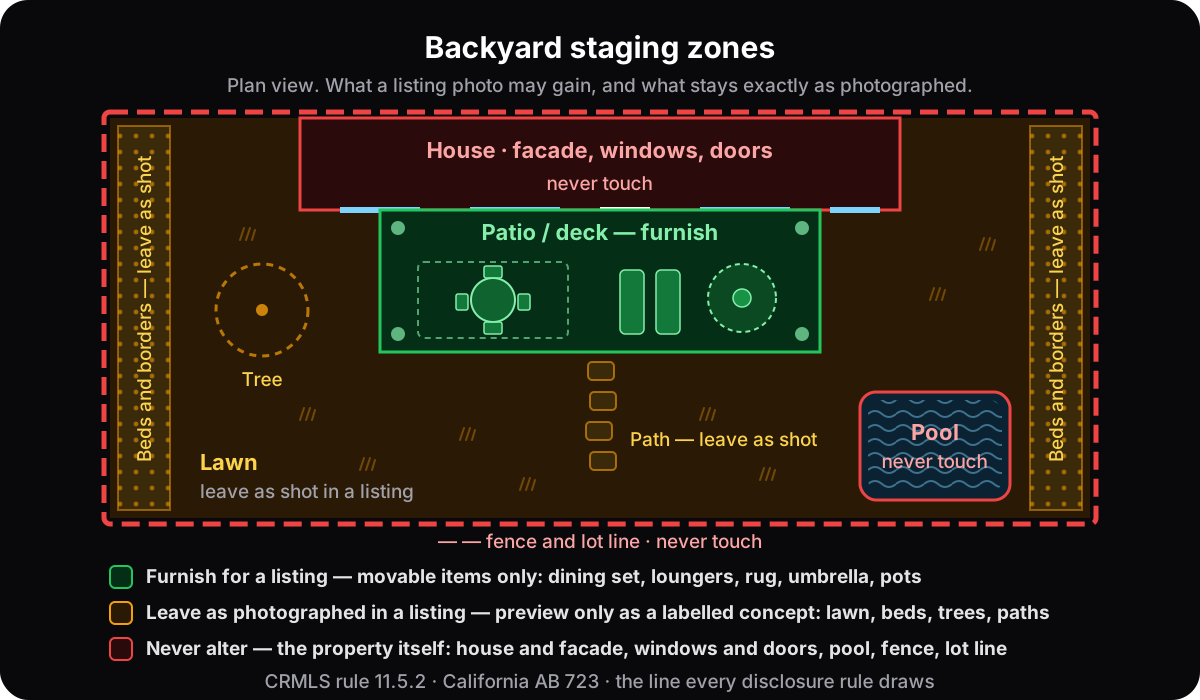
The property itself: the house and its facade, windows and doors, the roof, the pool, the fence and lot line, the view and the neighbours. And, for a listing photo, the ground too — lawn, beds, borders, trees, paving, paths and decking. Those are what the buyer is paying for; the furniture is not.
The lawn is the item people push back on. A patchy lawn in November looks unloved, and greening it up feels harmless because grass grows back. The rulebooks do not see it that way. CRMLS puts landscaping in the same sentence as wall colour, flooring and wall dimensions when it lists what may not be modified, and it says separately that AI-generated landscaping images are not permitted in the MLS because they may misrepresent the property. AB 723 lists landscaping and the facade among the elements whose alteration makes an image a digitally altered one. Ontario asks a plainer question — does the image still accurately depict the property? — and a lawn that is green in the photo and brown at the viewing does not. British Columbia's regulator uses removing nearby power lines as its example of an edit that goes too far; a rendered hedge where the neighbour's wall used to be is the same edit in reverse.
| Place it — movable, leaves with the seller | Leave it — the property, as photographed |
|---|---|
| Dining set, lounge chairs, loungers, a bench on feet | Lawn, beds, borders, hedges, trees |
| Outdoor rug, cushions, throws | Paving, decking, steps, paths, retaining walls |
| Market umbrella on a base | Pergola, gazebo, awning, outdoor kitchen, built-in grill |
| Plants in pots and planters | Pool, hot tub, pond, fountain |
| Freestanding fire bowl, lanterns, candles | Fence, gate, lot line, the neighbours' side |
| Grill on wheels, hammock on a stand | House facade, windows, doors, roof, garage, driveway |
| Bistro set on a balcony | The view, the light, the season |
The last row matters more outdoors than in. Rendering a grey afternoon as a golden evening changes the property as surely as a new hedge does — ordinary exposure correction is excluded from AB 723's definition of an altered image, and a rendered sunset is not.
How do you stage each kind of outdoor space?
The line is the same everywhere — furniture on a surface that already exists — but each space has its own trap. Here is what to add, what to leave and the mistake to look for in the render.
Patio
Add a dining set at one end and a lounge group at the other, an outdoor rug under the seating, an umbrella on a base, and pots at the edges. Leave the slab or pavers as they are, joints and stains included, and the planting around them. The mistake to look for is a patio that grew: a render that extends the paving into the lawn to fit a bigger set has changed the property. Choose furniture that fits the patio you have.
Deck
Add a table for two or four, a pair of loungers and planters standing on the boards. Leave the boards, the railings, the steps down to the yard and the view over the rail. The mistake is a deck that was refinished: weathered boards that come back freshly stained are a renovation, not staging.
Balcony and condo terrace
Add a bistro set, one lounger if it truly fits, a planter and a small rug. Leave the railing or glass, the floor, the view and the building opposite. The mistake is scale. Measure the furniture against the door, which is about two metres tall: a balcony furnished with undersized pieces looks bigger than it is, and that is the kind of image the rules are written against.
Backyard with a lawn
Stage the patio or deck if there is one. On the grass itself, add only things that stand on it — a pair of Adirondack chairs, a hammock on a stand. Leave the lawn its real colour and condition, the beds, the trees, the fence and the neighbours' side. The mistake is greening the lawn, which CRMLS counts as altered landscaping, as the table above shows.
Front porch and entry
Add two chairs or a bench, a planter or two by the door, a doormat, a lantern. Leave the facade, the front door and its colour, the steps and railings, the house number, the driveway and the street. The mistake is a fresh colour on the door or the shutters: that is the facade, and AB 723 names the facade among the elements an altered image changes.
Pool deck
Add loungers, an umbrella, side tables and towels. Leave the pool's shape and water, the coping, the pool fence, the hot tub and the equipment. The mistake is water that looks cleaner or bluer than it was; that is the condition of the pool, and the buyer will see the real one.
Winter and off-season photos
Leave the season alone: snow on the deck, bare trees and a brown lawn stay in the frame. Rendering July over a January photo changes the property's appearance as surely as a new hedge does. You can still stage a covered porch or a cleared patio with furniture, and if the yard is the selling point, a real photo taken in summer says it honestly. In Canada, where listings run through the winter, this comes up every year; the rules by province are in virtual staging in Canada.
What does "furniture only" look like?
Like this indoor pair. Everything the render added — table, chairs, rug, plants, art — is movable and would leave with the seller; the fireplace, the shelving, both windows and the fan are untouched. Hold an outdoor render to the same test: if the ground, the beds or the paving changed, it is a concept, not a listing photo.
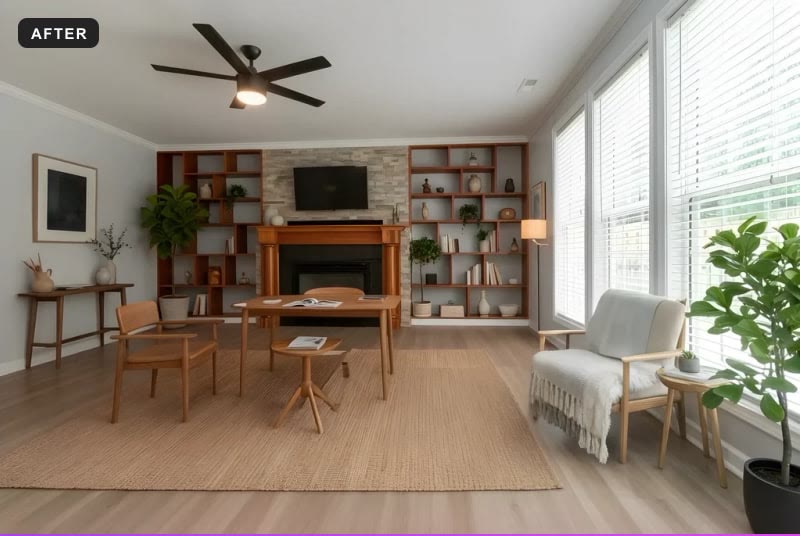
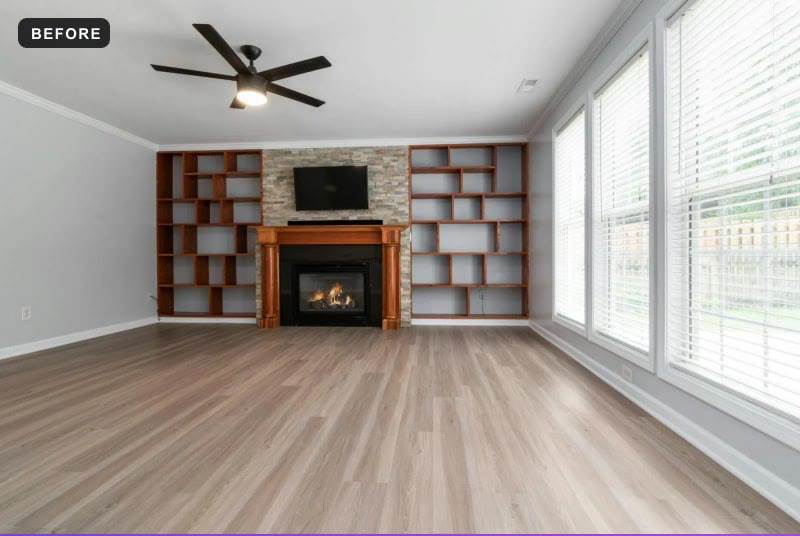
On a deck the checklist is the same length. Boards, railings and steps where they were; the fence and the trees behind them where they were; the lawn the colour it was; the sky the sky you shot. If all of that holds and the only new things are the furniture and the pots, the frame is a listing photo. If not, it is a preview, and previews have their own honest uses, covered below.
Which outdoor styles work?
The one that belongs to the house. Modern for a contemporary build, coastal for waterfront and cottage country, farmhouse for suburban and rural lots, a Zen garden for a courtyard and a buyer who wants calm. Pick one style for the whole listing and keep indoor and outdoor frames in the same family.
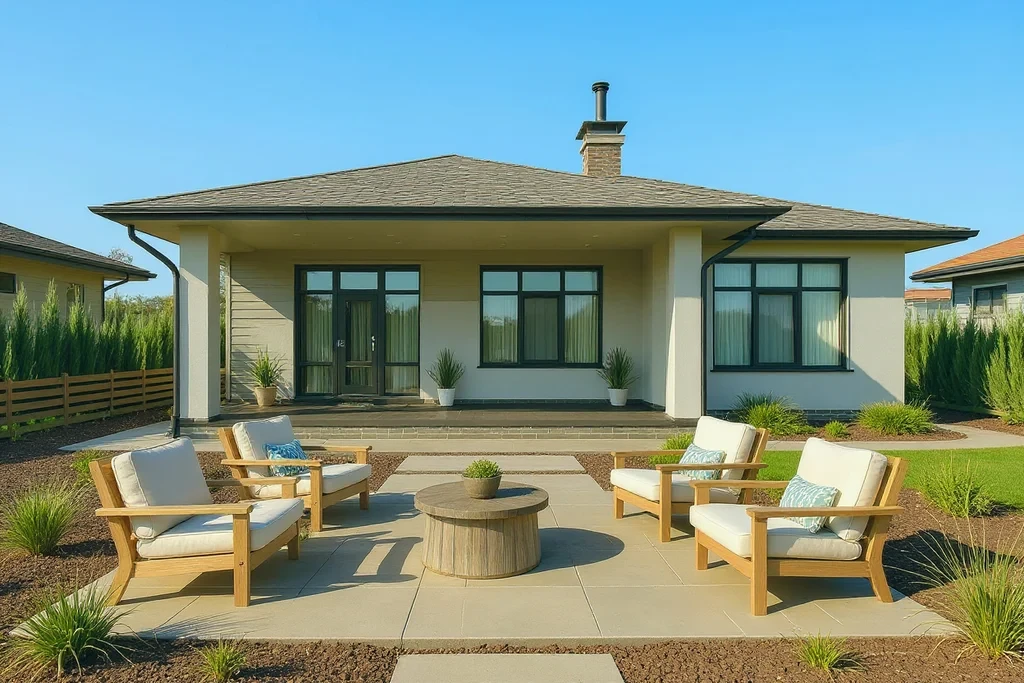
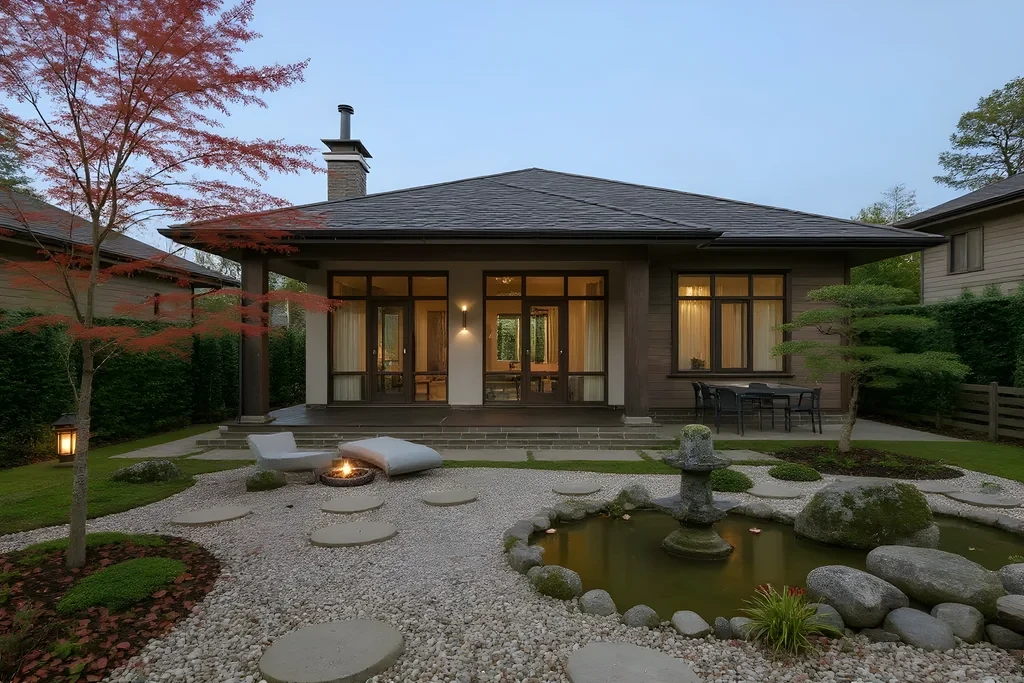
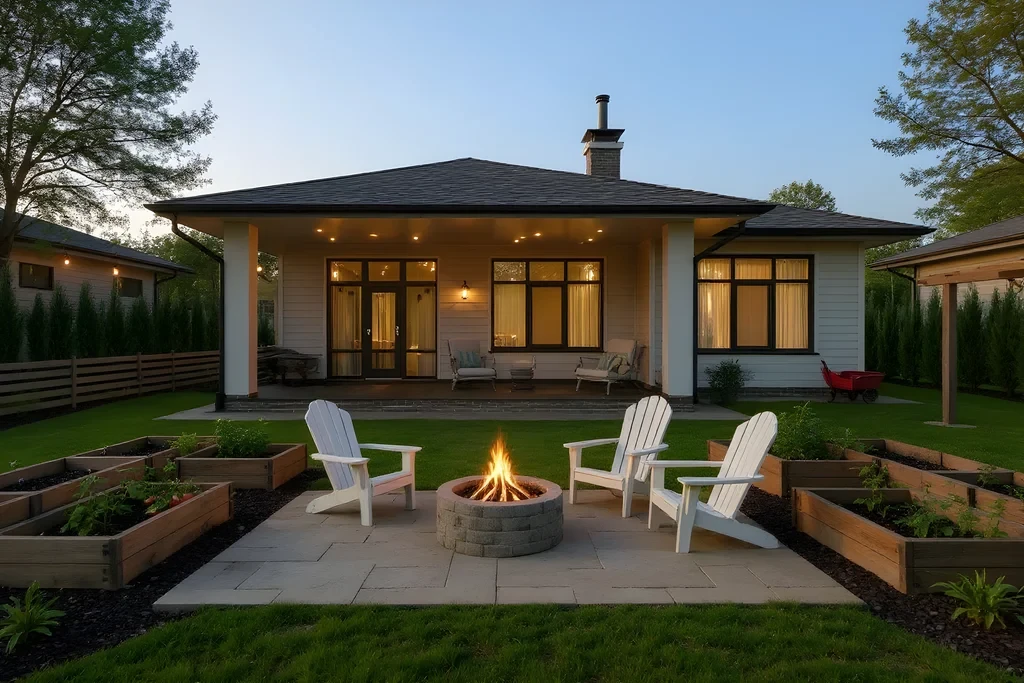
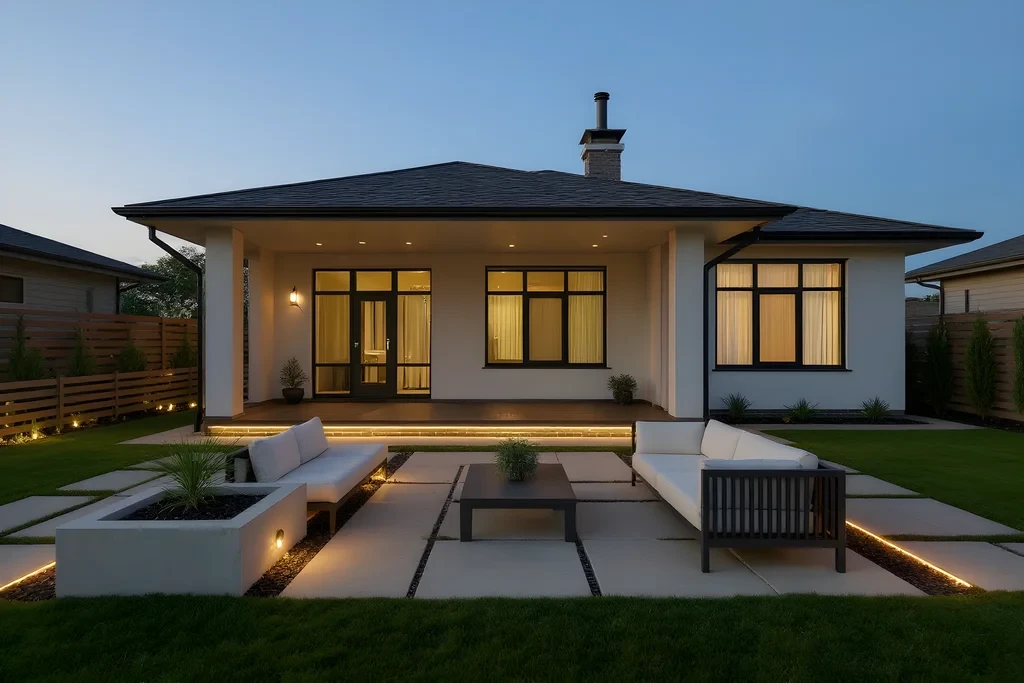
Each outdoor style page describes the whole picture — furniture, planting and paving together — because that is what a style is. For a listing frame, the furniture is the part you keep; the rest is what you are previewing.
- Modern outdoor — charcoal-and-white furniture, concrete planters, clean lines. Backyards and patios of contemporary properties.
- Coastal outdoor — weathered teak, blue-and-white cushions, dune grasses. Decks and patios of coastal and lakeside properties.
- Farmhouse outdoor — Adirondack chairs, a fire pit, string lights. Suburban and rural lots.
- Japanese Zen garden — raked gravel, stone, a single maple. Courtyards, and a buyer who wants a retreat rather than a lawn.
- Scandinavian minimalist — pale wood, a single birch, restraint. Small decks and city gardens.
- Mediterranean outdoor — terracotta, olive trees in pots, wrought iron. Warm-climate and villa-style properties.
If you are staging the interior too, keep the two in one family: a Japandi living room and a farmhouse yard read as two houses. The style pages say plainly what kind of property each direction suits, and the full library lists all ten outdoor directions.
Can you preview landscaping at all?
Yes — for yourself. Landscaping previews are useful for planning a garden, briefing a landscaper, or marketing you control, provided the image is labelled as a concept and the original is kept. What you cannot do is put an AI-landscaped image in a listing as though it showed the property.
This is where the ideas the old advice put in listings actually belong — and they are good ideas there.
- Homeowners. See your own yard three ways before you call a landscaper: fuller beds, a gravel garden, a lawn replaced by planting. It is the outdoor version of seeing your room before you renovate, and it settles the argument about the gravel in a minute.
- Landscapers and designers. A concept board on the client's own photograph, not a stock image of someone else's garden. Label it as a concept and the client knows exactly what they are looking at.
- Investors and flippers. Decide whether the yard is worth a budget before you spend it. If the concept moves you and the render of the furniture alone does not, the garden is the work.
- Agents. Listing photos: no. A labelled concept in a brochure or a social post is a different thing from a listing photo, but it is still an altered image — in California the statutory statement and the link to the original apply anywhere you advertise, and everywhere the test is whether a buyer would feel misled. Put "Landscaping concept — not the current garden" on the image itself, and keep the photograph next to it.
How does AI outdoor staging work?
Upload a photo of the patio, deck or yard, pick an outdoor style, and a render comes back in 15–60 seconds, depending on how much detail the space has. Then do the check that matters: put the render beside the original, and publish in a listing only a frame where nothing but the furniture is new.
- Shoot it well. Even light, camera level at chest height, the 1x lens rather than the ultra-wide, hoses and bins cleared. Exteriors are unforgiving about clutter, and the tidy original is also the file you will keep. The detail is in how to photograph rooms for virtual staging; it applies outside as well.
- Upload on the generate page. Outdoor styles are part of the Pro and Agency plans. Every new account gets 3 free renders with no card on the interior styles, so you can judge the realism on a room first; the pricing page has the current plans.
- Pick the style that belongs to the house, once, for the whole listing.
- Check against the original. The outdoor engine on AI Flip Room is told to keep the fence, the property line, the existing trees, the terrain, the sky and the house where they are, and to leave a drive or a path usable. The last look is still yours: house, fence, trees, ground, pool, and nothing standing in a doorway or on the steps. Anything that changed the ground is a concept — keep it for planning or regenerate.
- Label it and keep the original. A visible mark on the image where your MLS allows text on photos, a line in the remarks, the untouched file at full size. In California, the label in the photo description field, the original immediately before or after, and the statement and link everywhere else you advertise. The seven-step routine for a whole listing is in the workflow for listing agents.
Putting it together
The exterior is the handshake of the listing. Staged honestly — a patio that reads as a room, a deck that reads as a place to sit, and a garden that looks exactly the way it will look on the day of the viewing — it sets the tone for everything a buyer feels inside. Everything beyond that, the fuller beds and the greener lawn and the gravel garden, is a preview: valuable for deciding what to do with a yard, and clearly labelled as a concept whenever anyone else sees it.
Questions about outdoor staging
Can you virtually stage a backyard for an MLS listing?+
Yes, within the same line as indoors: furnish, do not alter. Add a dining set, loungers, a rug, an umbrella, potted plants or a fire bowl to the patio or deck that is already there, label the image as virtually staged, and keep the original. The lawn, beds, paving, pool, fence, house and view stay exactly as photographed. In California, CRMLS also wants the original immediately before or after the staged frame.
Is AI-generated landscaping allowed in listing photos?+
Not in CRMLS, California's largest MLS: rule 11.5.2 states that AI-generated landscaping images are not permitted because they may misrepresent the property, and AB 723 lists landscaping among the alterations that require a conspicuous statement and a link to the original. Elsewhere the test is accuracy; Ontario bans altered images that do not accurately depict the property. Treat a greener lawn or fuller beds as a concept for your own planning, never as a listing photo.
Can virtual staging add a pool, pergola or fire pit to a yard?+
As a concept for your own planning, yes; in a listing photo, no. A pool, a pergola, a deck extension, an outdoor kitchen or a built-in fire pit is part of the property, and a buyer would expect to find it on the day. A freestanding fire bowl, a hammock on a stand or a grill on wheels is furniture and may be staged. When in doubt, ask whether it would leave with the seller.
Do outdoor virtually staged photos need a label?+
Yes, the same as indoor ones. Put a visible virtually staged mark on the image where your MLS allows text on photos — some, such as Florida's Stellar MLS, ban it — say so in the listing remarks, and keep the untouched original at full size. In California the label goes in the photo description field, the original sits immediately before or after the staged image, and anywhere else you advertise the image needs a conspicuous statement plus a link or QR code to the original. Use your board's wording if it publishes one.
What outdoor spaces can be virtually staged?+
Patios, decks, balconies and condo terraces, front porches, pool decks and backyards — any space where furniture can stand on a surface that already exists. Each has its own trap: a patio that grows in the render, a deck that comes back refinished, a balcony furnished with undersized pieces, a lawn that turns greener, a front door in a new colour, pool water that looks cleaner than it was. The furniture is the only thing that should be new.
Is there a program that stages outdoor furniture?+
Yes. AI staging tools with outdoor modes do it from a photo: upload the patio, deck or yard, pick an outdoor style, and a render comes back in seconds. AI Flip Room has ten outdoor styles on the Pro and Agency plans, and each render takes 15–60 seconds. An outdoor style also suggests planting and paving, so for a listing check the render against the original and keep only frames where nothing but the furniture changed.
Can you virtually stage a backyard in winter?+
You can add furniture to a cleared patio, deck or porch, but leave the season as it is: the snow, the bare trees and the brown lawn stay. Turning a winter photo into a summer one changes how the property looks on the day of the viewing, which is exactly what a listing photo may not do. If the garden is the selling point, use a real photo taken in summer.
See it on your own room
Upload a photo and watch AI restage your space in 15–60 seconds, depending on how much detail it has — free to try, no credit card.
Try AI Flip Room freeGot a question about this?
Something unclear or not covered? Ask here. We read every question and answer the useful ones right in the article. Nothing you write is published.
Related reading
California Virtual Staging Rules: AB 723 + CRMLS 11.5.2
Since 1 January 2026 California regulates altered listing photos by statute. What AB 723 requires, what CRMLS 11.5.2 adds, the $250 fine, and a checklist.
Virtual Staging Disclosure Rules: How to Label Staged Photos
Why disclosure is required, three ways to label a virtually staged photo, what you may change vs never touch, and the rules of fourteen jurisdictions compared.
See Your Own Room in a New Style Before You Buy Anything
Preview your actual room in a new style before buying furniture or hiring anyone: what a preview settles, what it can't, and five steps to a useful one.