Virtual Staging Disclosure Rules: How to Label Staged Photos
AI Flip Room · 27 min read
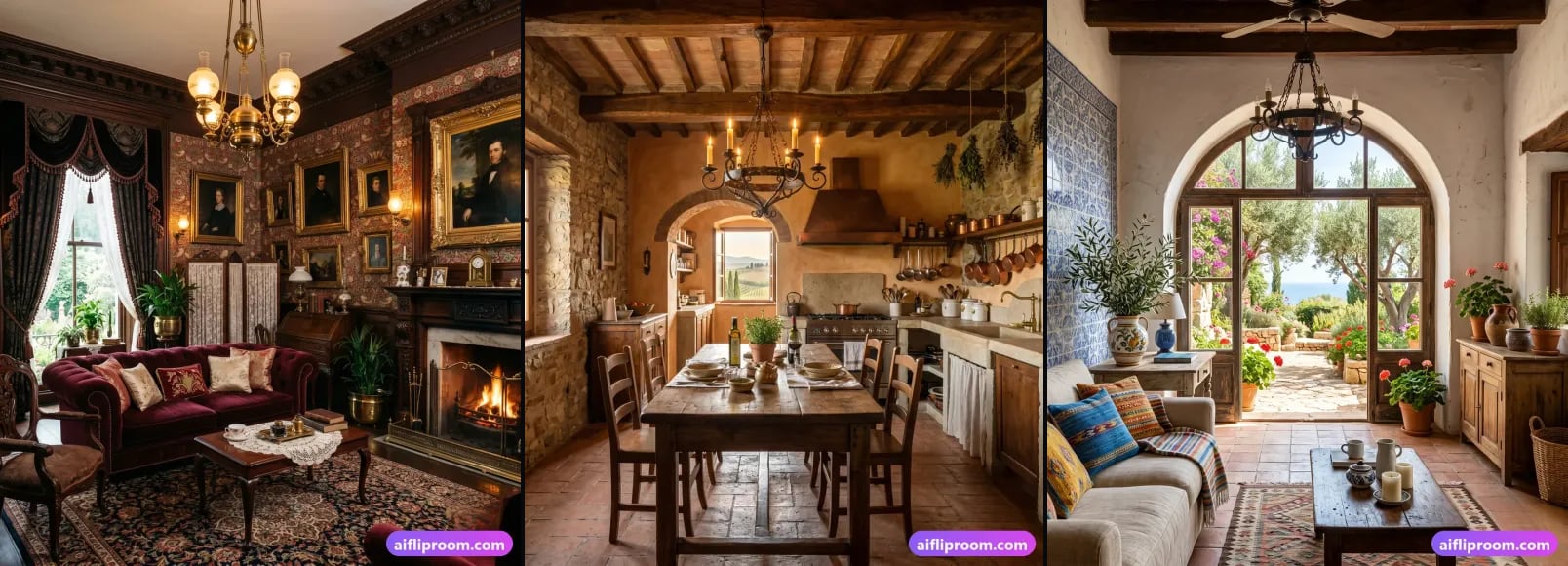
Virtual staging puts furniture into a photo of an empty room in seconds. The same speed that makes it useful is what makes disclosure necessary: a buyer scrolling a listing cannot tell a rendered sofa from a real one and should not have to guess. A short, visible label closes that gap, and it costs the photo nothing.
This is the hub of our disclosure guides. It covers why a label is expected, three ways to attach one, the line between furnishing a room and altering it, and what happens when that line is crossed. For the fourteen places where we have read the primary sources — Ontario, California, British Columbia, Quebec, Alberta, New York, Florida, Texas, Washington, Arizona, Illinois, the Bright MLS region of the Mid-Atlantic, Georgia and Colorado — the detail lives in the linked articles, and the table below agrees with them word for word. We make an AI staging tool, which is a reason to be careful here rather than casual.
Why is virtual staging disclosure required?
Because a listing photo is read as a record of the property, and a staged photo is a proposal. Every advertising rule we have read — an MLS rulebook, a state statute, a regulator's guideline — rests on one duty: do not advertise a property in a way that misleads. An unlabelled staged photo can do exactly that; a labelled one cannot.
That duty is written down in different places. In the United States it is Article 12 of the National Association of REALTORS Code of Ethics: members "shall be honest and truthful in their real estate communications and shall present a true picture in their advertising, marketing, and other representations". In Ontario it sits in the Code of Ethics under the Trust in Real Estate Services Act, which requires that advertising not be false, misleading or deceptive. In British Columbia it is section 41 of the Real Estate Services Rules, "False or misleading advertising prohibited". In California, since 1 January 2026, it is a statute written specifically about altered listing images.
Virtual staging does not break that duty on its own. A staged photo says: here is how this room could look furnished. Trouble starts when a viewer cannot tell what is real from what is rendered — when a buyer assumes the sectional and the rug convey with the house, or that a cracked ceiling was always pristine. Modern AI staging is realistic enough that buyers usually cannot spot it, which is why the label matters more now, not less. It tells everyone the image was edited to show the space's potential. Buyers still get inspired, you still get the striking photo, and nobody feels tricked at the showing.
Which rules actually mention virtual staging?
Fewer than the internet suggests. Of the rulebooks we have read in full, eight use "virtually staged" or a close variant as a label term: California's CRMLS; upstate New York's Alliance MLS rules, which require it on the photo itself; Florida's Stellar MLS, which requires it in the photo description and bans words on the photo; in Texas, Houston's HAR, which wants it in the Photo Description, and San Antonio's SABOR, which makes it a pick-list option; in Arizona, Tucson's MLSSAZ, which wants a "virtual staged" disclosure along the top of the image; Illinois's MRED, which has permitted "virtually staged photos" since at least 2014 and takes the disclosure as a Yes/No field, "Are Any Property Photos Virtually Staged?"; and Bright MLS in the Mid-Atlantic, which since 22 July 2026 wants both the Private and Public Remarks to say the image is "virtually staged or digitally modified". Arizona's ARMLS went the other way in May 2026: its label is "Digitally Altered", a broader term that covers staging, applied as its own watermark. Ontario's PropTx rulebook never uses the phrase "virtual staging" at all; it bans altered images "that do not accurately depict the listed real estate". British Columbia's regulator says virtual staging "may be okay" if labelled. Alberta's provincial MLS rules define both "Virtual Staging" and "Virtual Enhancing" and require staged images to be disclosed in the public remarks, without prescribing a label term. In Georgia all three MLSs have a written rule: FMLS rule 20.1(e) on "staged photos", Georgia MLS's photo policy on "virtually staged photos", and Hive MLS's rulebook, which wants them "identified in the Marketing/Public Remarks and by either text on the photo or in its description". In Colorado the three MLSs we read split another way: REcolorado's policy says "Virtual staging is allowed." and asks for no label, IRES has no staging rule, and elevateMLS wants the "Virtually Staged" field set to Y and the exact phrase "Virtually Staged" in the Property Description and the Photo Remarks, with the unaltered original uploaded as well.
That matters because the most repeated claim about virtual staging — one unstaged photo for every staged one — is a real rule, but it is CRMLS rule 11.5.2 in California, the Alliance MLS rules in upstate New York since September 2026, Unlock MLS rule 2.15 in Austin, ARMLS rule 8.23 in Arizona since May 2026, and MLSSAZ section 1.19(I) in Tucson. It is not in the Ontario rulebook, which has no pairing requirement and whose only image minimum is "at least one image of the listed real estate" (rule 3.07(c)). Even in Los Angeles it depends on the MLS: The MLS™/CLAW asks for a label and a link to the original, not the pair. Much of what is written about this takes the most quotable rule available, California's, and repeats it as though it described North America. If someone quotes a labelling or pairing rule at you, ask which rule number they mean.
Here is how they compare, taken from the primary sources we have read in full. Each cell agrees with the detailed article it links to.
| Ontario | California | British Columbia | Quebec | Alberta | New York | Florida | Texas | Washington | Arizona | Illinois | Bright MLS (MD, PA, VA, DC) | Georgia | Colorado | |
|---|---|---|---|---|---|---|---|---|---|---|---|---|---|---|
| Who sets the rule | PropTx MLS Rules, the listing platform's rulebook; above it, RECO under the TRESA Code of Ethics | The state: AB 723 adds section 10140.8 to the Business and Professions Code; CRMLS rule 11.5.2 sits on top for its members | The regulator: BCFSA's Artificial Intelligence Guideline (22 February 2024), interpreting the Real Estate Services Rules | The regulator: OACIQ's advertising guideline, section 6.3.1 (last update 17 June 2026), interpreting section 112 of the brokerage Regulation | The boards: the Provincial MLS® System Listing Rules shared by Alberta's ten boards (January 2024); above them, RECA's Real Estate Act Rules | The MLSs: upstate, the New York State Alliance MLS rules (1 September 2026); above them, the Department of State's advertising rule, 19 NYCRR 175.25 | The MLSs: Stellar MLS Article 04.04, and the rulebooks of SEFMLS, BeachesMLS and realMLS; above them, the Real Estate Commission under section 475.25(1)(c) of the Florida Statutes | The MLSs: HAR Rule 1.25.1, NTREIS rule 7.30, Unlock MLS rule 2.15 and SABOR section 1.2(b); above them, TREC under section 1101.652(b)(23) of the Occupations Code and rule 535.155 | The state: RCW 18.85.361(2), read through the Department of Licensing's advertising guideline. NWMLS's rulebook is members-only; Spokane's has no staging rule | The MLSs: ARMLS rule 8.23, in force since 28 May 2026, and MLSSAZ section 1.19(I) in Tucson; above them, the Department of Real Estate under rule R4-28-502 | The MLSs: MRED section 6.2, revised 14 May 2026 and unchanged in substance since 2014, for the Chicago area and much of the state; MARIS in the Metro East; above them, the Department of Financial and Professional Regulation under section 10-30 of the Real Estate License Act | The MLS: the Bright MLS rules, effective 22 July 2026 — Appendix C on images, Appendix D on disclosures — for Maryland, Delaware, DC and parts of Pennsylvania, New Jersey, Virginia and West Virginia; above them, the Maryland Real Estate Commission, Pennsylvania's State Real Estate Commission and the Virginia Real Estate Board | The MLSs: FMLS rule 20.1(e), in the rulebook effective 14 January 2026; Georgia MLS's photo policy of 9 September 2020; Hive MLS's rules of May 2026 for Savannah, Augusta and Athens; above them, the Georgia Real Estate Commission under rule 520-1-.09 and section 43-40-25 | The MLSs: REcolorado's MLS Policy, section 1.20, revised November 2025; the IRES rules revised August 2026; elevateMLS's rules effective 19 August 2026, Appendix E item 23, for El Paso and Teller counties; above them, the Colorado Real Estate Commission under rule 6.10.C and section 12-10-217 |
| The gist | An accuracy test. Altered or AI-created images and digital staging are banned if they "do not accurately depict the listed real estate" (rule 5.01) | A procedure. Say the image was altered, link to the original, never change the property itself | Guidance. Virtual staging "may be okay"; label altered photos; false or misleading advertising is prohibited | Guidance with a minimum. Label any AI image; never hide defects or alter the structure; keep the originals | Two definitions. Virtual staging, unattached chattels of realistic size, is allowed if disclosed; virtual enhancing is not permitted (rules 1.01 hh and ii, 2.04 h) | Upstate, a fixed label on the image and the original first; elsewhere, an accuracy test: an "honest and accurate description" of the property | On Stellar, a fixed label in the listing's fields and none on the image; furniture and décor only. BeachesMLS wants it early in the remarks and photo descriptions, realMLS in the remarks or a caption; SEFMLS has no staging rule | Four answers. HAR: furnishings and wall décor only, disclosed in the Photo Description; a fixed watermark and the unaltered view only when the property itself is altered. NTREIS: a true current photograph, no modification that misrepresents. Unlock: the unstaged view beside the staged one. SABOR: furnishings and wall décor, a pick-list option | A duty, not a procedure. No false description the licensee knew or with reasonable care could have known to be false; advertising must not be capable of misleading a reasonable consumer | A watermark and a pair. On ARMLS, any digitally altered photo, staging included, carries the MLS's own "Digitally Altered" watermark and sits next to its original, with no other text on the image. MLSSAZ: a label along the top and the unmodified photo adjacent | A field, not a mark. On MRED, furniture and other personal property may be added, nothing outside the owner's control may be added or removed, and the listing answers "Are Any Property Photos Virtually Staged?". MARIS exempts staging from its altered-photo rule | Two fields, no mark. Staging, AI included, is allowed for furniture and other personal property; nothing outside the owner's control may be added or removed; the disclosure goes in both remarks fields | Three MLSs, three answers. All three allow furniture and other personal property and want it in the remarks; FMLS and Georgia MLS keep text off the photo, Hive MLS accepts it, and only Georgia MLS wants the original beside the staged photo | Three MLSs, three answers. REcolorado says "Virtual staging is allowed." and asks for no label; IRES has no staging rule; elevateMLS wants a field, the exact phrase "Virtually Staged" in two places, the unaltered original uploaded and its own watermark on the photo |
| Label required? | Not for staged images — 5.01 requires labels only for drawings, floor plans, maps and aerial or distance photos. Absence is not permission | Yes. A "reasonably conspicuous" statement on or adjacent to the image (statute), and "virtually staged" or similar in the photo description (CRMLS) | "You should label" — guidance, backed by the binding ban on misleading advertising (Rules section 41) | Yes, as the guideline's "minimum requirement": a clear and visible statement such as "Image generated by artificial intelligence" | Yes, in the public remarks (rule 2.04 g). Rule 2.04 b restricts text on the photo itself; whether a staging label passes is unsettled | Upstate, yes: a text overlay reading "Virtually Staged."; captions or remarks alone are not acceptable. No label rule found in REBNY's RLS or OneKey's public pages | On Stellar, yes: "Virtually staged" in the photo description, a checkbox, and public remarks that open with "One or more photo(s) was virtually staged." BeachesMLS: within the first 180 characters of the remarks and photo descriptions. Text on the photo is banned on Stellar, SEFMLS and BeachesMLS | HAR: yes, in the Photo Description. SABOR: yes, the virtually staged option under the photo description. NTREIS and Unlock: no label rule; NTREIS bans embellishments and Unlock may remove stamped text | No published rule. A secondary source says NWMLS Rule 105(d) wants "virtually staged" on the image or in the photo description; we could not verify it | Yes. ARMLS: "an MLS system-provided watermark" reading "Digitally Altered", applied in Flexmls; its old "Virtually Staged" watermark is no longer approved. MLSSAZ: a "virtual staged" disclosure "prominently placed along the top of the image" | Yes, as a field: Y in "Are Any Property Photos Virtually Staged?", which adds a note to the reports and the photo browser. Text, logos and branding on the photo are banned. MARIS: no staging disclosure required, and no added text on photos | Yes, in words: the Private and Public Remarks "must state that the image is virtually staged or digitally modified". Text and graphics added to the photo are banned, except for homes to be built or under construction | Yes, in the public remarks on all three, in words of your choice. FMLS: "No text may be superimposed on photos." Georgia MLS: "watermarks" are "not allowed". Hive MLS also wants "either text on the photo or in its description" | On elevateMLS, yes: the "Virtually Staged" field set to Y, and "The Property Description and Photo Remarks must contain the exact phrase" "Virtually Staged"; the MLS then adds its own watermark. On REcolorado and IRES, no rule asks for one; we add a sentence in the public remarks anyway |
| Original required? | No pairing rule. The only minimum is one image of the property (rule 3.07(c)) | Yes. A link, URL or QR code to the unaltered image (statute); the original immediately before or after the staged one (CRMLS) | Not required. Keep it available | Keep it on file and make it available on request; showing it beside the staged image is not required | No pairing rule. Keep it anyway | Upstate, yes: directly before the staged photo. No pairing rule found elsewhere | Not on Stellar, SEFMLS or BeachesMLS. realMLS: "a non-enhanced photo must be submitted to show the difference", without saying where | Unlock: yes, "a non-virtually staged image of the same view". HAR: only when the property is altered, as an adjacent image, with the altered one never primary. NTREIS and SABOR: no | No published rule. Keep it; under RCW 18.85.361(2) reasonable care is the standard | Yes. ARMLS: "directly before or after" the altered photo. MLSSAZ: "an unmodified copy of the photo adjacent to the staged photo" | No pairing rule on MRED. MARIS wants the original "in succession" only for altered photos, and exempts staging | No pairing rule. Keep it anyway | Georgia MLS: yes, "immediately before or immediately after" the staged image, under its 2020 photo policy; check with Georgia MLS that it still applies. FMLS and Hive MLS: no pairing rule | elevateMLS: yes, "The unaltered original photo of a virtually staged photo must also be uploaded", with no place prescribed. REcolorado and IRES: no |
| What is forbidden | Any altered image that does not accurately depict the property | Adding, removing or modifying any real part of the property; AI landscaping; unlabelled digital de-cluttering | Altering a photo so it misrepresents the property — BCFSA's own example is removing nearby power lines | Using AI to hide defects, alter the structure or misrepresent a property; images that "fundamentally alter the actual appearance" of it | Virtually enhanced images, such as changed walls or windows, and "any photos that may misrepresent the property" | Upstate, changes that alter or misrepresent the structure or grounds — landscaping, a wall colour, a structural defect — plus watermarks and people | On Stellar, staging the exterior beyond unattached furniture or décor, any change to permanent fixtures, an invented view, hidden damage, and furniture scaled to make a room look larger | NTREIS: any modification that "would misrepresent the true condition or appearance of the property". SABOR: altering the structure or grounds — its examples are a pool, landscaping and removed power lines — and people in photos. HAR: altered property without the watermark and the pair | A description of the property that a reasonable consumer could take for real when it is not, however careless the error | ARMLS: media altered "to materially misrepresent the existing condition or existing structure of a property, unless disclosed", any text or watermark ARMLS did not provide, and people except in the background. Statewide, "misleading or ambiguous impressions" | MRED: adding "visual elements not within a property owner’s control" — its example is a view of the Chicago Bean that cannot be seen from the property — or removing them, such as "power lines, water towers and/or nearby highways"; names, logos, branding, persons and text commentary on photos. Statewide, advertising that is "fraudulent, deceptive, inherently misleading, or proven to be misleading in practice" | Adding or removing "visual elements not within a property owner’s control" — Bright's examples are an impossible view and removed power lines, water towers or nearby roads; people, "computer-generated" ones included; added text, graphics, signs and logos on photos. Under state law, misleading advertising | Removing "elements outside the property owner's control" — buildings next door, power lines, utility poles, water towers, retaining walls, highways; on Georgia MLS also views "that do not exist", invented fixed features and furniture too big for the room. Realistic landscaping is allowed. Statewide, advertising "misleading or inaccurate in any material fact" | Any photo where "the true appearance of a property has been manipulated": REcolorado and elevateMLS both name "removing a permanent object from the photograph, modifying the appearance of the landscape, making visual improvements that do not already exist"; on elevateMLS the primary photo "may not be virtually altered" and no "Images of people". Statewide, "false or misleading advertising" |
| Source | PropTx MLS Rules (PDF) · our full read | AB 723 text · CRMLS guidance · our full read · Los Angeles | BCFSA AI Guideline · BCFSA Advertising Guidelines · our full read | OACIQ guideline 6.3.1 · our full read | Alberta MLS® rules (PDF) · our full read | Alliance MLS rules (PDF) · our full read | Stellar MLS Article 04.04 · our full read | HAR MLS Rules (PDF) · Unlock MLS rules (PDF) · our full read | RCW 18.85.361 · DOL advertising guidelines (PDF) · our full read | ARMLS Rules & Regulations (PDF) · ARMLS on digitally altered media · our full read | MRED Rules and Regulations (PDF) · MRED Residential Glossary (PDF) · our full read | Bright MLS Rules (PDF) · Bright on virtual staging · our full read | FMLS Rules (PDF) · Georgia MLS photo policy · Hive MLS Rules (PDF) · our full read | REcolorado MLS Policy (PDF) · IRES Rules (PDF) · elevateMLS Rules (PDF) · our full read |
Two things the table cannot say loudly enough. Ontario's missing label rule is not permission: rule 5.01's accuracy test applies to every image, labelled or not, and the Code of Ethics applies wherever you advertise. And rules are amended: your own MLS handbook and your broker are always the final word, and a two-minute email to the compliance desk is cheaper than a fine.
Texas, in four rulebooks. The state has no staging rule; its four big MLSs do, and they differ. Houston's HAR limits staging to "furnishings and wall décor", wants the note in the Photo Description, and reserves its watermark — "Image does not represent actual property as is", beside the unaltered view and never as the primary photo — for images that alter the property. NTREIS in Dallas–Fort Worth never uses the words and allows "only a true current photograph" without modifications "that would misrepresent the true condition or appearance of the property"; MetroTex, one of its owners, puts it plainly: "Virtual staging is acceptable in many cases, but large-scale virtual renovations can become problematic." Austin's Unlock MLS wants "a non-virtually staged image of the same view"; San Antonio's SABOR wants the virtually staged option on the photo-description pick list and names what may not change: a pool, landscaping, removed power lines. The Texas article quotes all four.
Washington, with one caveat. No Washington statute or Department of Licensing rule mentions staging; what applies is RCW 18.85.361(2), a ban on false descriptions the licensee "knew or, by the exercise of reasonable care and inquiry, could have known" to be false, and the DOL guideline's test that advertising "must not mislead or be capable of misleading a reasonable consumer". The rulebook most of the state follows, NWMLS's, is published to members only; a licensing school's account says its Rule 105(d) wants a "virtually staged" label on the image or in the photo description, and we could not check it. The 2026 AI act, HB 1170, binds AI providers from February 2027 and never mentions real estate. The Washington article says what we could and could not verify.
Arizona, under the MLS's own watermark. Since 28 May 2026, ARMLS rule 8.23(n) treats a staged photo as "Digitally Altered": it must carry "an MLS system-provided watermark applied directly to the Media", added in Flexmls, and be "paired directly before or after with the corresponding unaltered original Media item". No other text or watermark may go on the image, and ARMLS's old "Virtually Staged" watermark is no longer approved. Fines of $200 start in December 2026, after a six-month education phase. Tucson's MLSSAZ asks for a "virtual staged" disclosure along the top of the image and the unmodified photo beside it. Above both sits rule R4-28-502, which since December 2025 bans "misleading or ambiguous impressions" and names artificial intelligence as a medium of advertising. The Arizona article quotes the rules and explains the watermark.
Illinois, in a field. MRED, the MLS of the Chicago area and much of the state, has permitted "virtually staged photos" in section 6.2 of its rulebook since at least its 2014 edition: furniture, mirrors, artwork and plants may go in, nothing "not within a property owner’s control" may be added or removed — its examples are a view of the Chicago Bean that cannot be seen from the property, and removed power lines — and "Disclosure of virtually staged photo(s)/rendering(s) is required in the specified field", a Yes/No field named "Are Any Property Photos Virtually Staged?". No watermark, no pair, and no text, logos or branding on the photo. In the Metro East, MARIS wants altered photos marked and followed by the original but exempts staging from that duty. Above both, section 10-30 of the Real Estate License Act bans advertising that is "fraudulent, deceptive, inherently misleading, or proven to be misleading in practice". The Illinois article quotes the rules and explains the field.
Bright MLS, in both remarks. Since 22 July 2026 the rules of Bright MLS — the MLS of Maryland, Delaware, the District of Columbia and parts of Pennsylvania, New Jersey, Virginia and West Virginia — define virtual staging as "using software (including Generative AI) to create or modify a photo or conceptual rendering" and say it "must be disclosed in the Private and Public Remarks": both fields, in words such as "virtually staged or digitally modified". Furniture, mirrors, artwork and plants may go in; "visual elements not within a property owner’s control" may not be added or removed, and Bright's example is "removing power lines, water towers, or nearby roads". No watermark and no pair are required, and text or graphics "added or superimposed" on photos are banned. Above the MLS, Maryland, Pennsylvania and Virginia ban misleading advertising in general. The Bright MLS article quotes the rules and the state laws.
Georgia, three MLSs and three answers. FMLS, Georgia MLS and Hive MLS each have a written staging rule. All three want the fact in the remarks: FMLS rule 20.1(e) says "All staged images must be designated as such in the public remarks", and Georgia MLS's photo policy says the same of "virtually staged images". They split on the photo itself: FMLS says "No text may be superimposed on photos", Georgia MLS bans "watermarks", and Hive MLS wants staged photos identified "by either text on the photo or in its description". Only Georgia MLS asks for the original, "immediately before or immediately after" the staged image, in a photo policy of 9 September 2020 that we could not confirm is still applied unchanged. FMLS and Georgia MLS both allow "landscaping improvements that could realistically be made" and ban removing "power lines, utility poles, water towers, retaining walls" and the like. Above the MLSs, the Real Estate Commission bans advertising that is "misleading or inaccurate in any material fact". The Georgia article quotes all three rules and the state law.
Colorado, allowed outright, silent, and spelled out. REcolorado's MLS Policy, revised November 2025, ends its photo rule with "Virtual staging is allowed." and asks for no label; its photo FAQ says virtual staging "is not considered manipulating photos or the appearance of the property". The IRES rulebook, revised August 2026, does not mention staging and asks for "accurate listing data". elevateMLS, the former Pikes Peak MLS in Colorado Springs, spells it out in its rules effective 19 August 2026: the "Virtually Staged" field set to Y, "The Property Description and Photo Remarks must contain the exact phrase" "Virtually Staged", the MLS's own watermark on the photo, the unaltered original uploaded, and an exterior primary photo that "may not be virtually altered". REcolorado and elevateMLS ban any photo where "the true appearance of a property has been manipulated", with "modifying the appearance of the landscape" among the examples. Above the MLSs, the Real Estate Commission makes brokers responsible for "the accuracy of information entered into Multiple Listing Services". The Colorado article quotes all three rulebooks and the state's rules.
How do you label a virtually staged photo?
Three ways, and the safe habit is to use at least two: a badge on the image itself, one sentence in the listing description, and the unedited original shown beside the staged photo. California prescribes the form; Ontario and British Columbia leave it to you. Keep the wording plain — "Virtually staged" says everything a buyer needs. For the exact words and where they go on one MLS, pick it in our free disclosure wording tool.
1. A badge on the photo itself
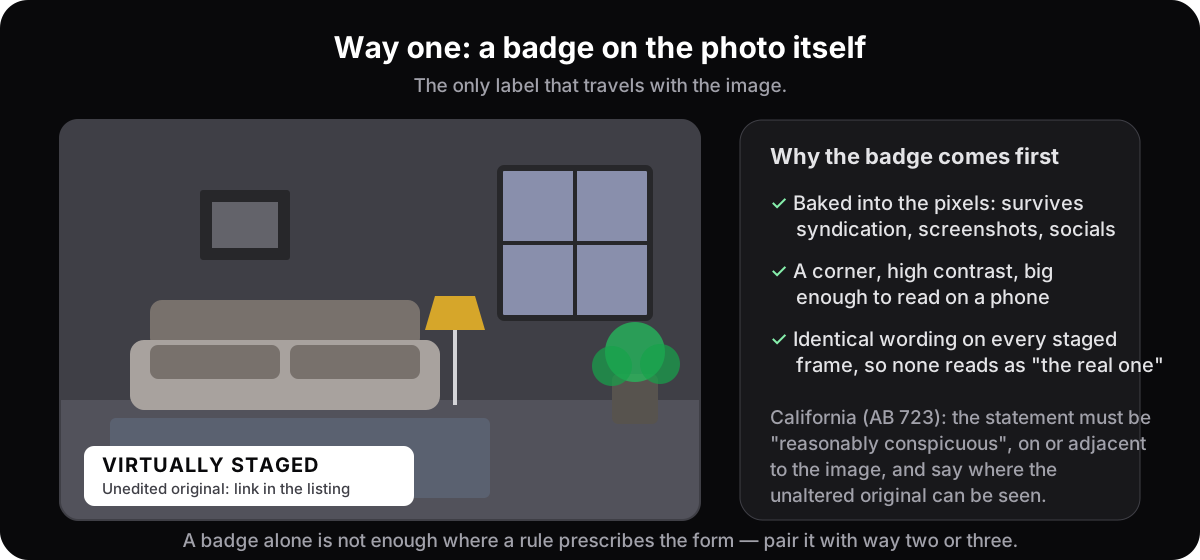
Text baked into the pixels travels with the image — into the syndicated copy, the screenshot, the social post — so it is the one label you cannot lose. Put it in a corner, in type a phone screen can read, and use identical wording on every staged frame so no single image reads as the untouched truth. In California the statute asks for more than the word: the statement must be "reasonably conspicuous", sit on or adjacent to the image, and say where the unaltered original can be seen. Check your MLS before you badge, though: in Florida, Stellar MLS, SEFMLS and BeachesMLS ban text on listing photos, so there the label goes in the photo description and the remarks. In Texas, HAR and SABOR keep the label in the photo-description field, NTREIS bans embellishments and Austin's Unlock MLS may remove any stamped text. In Arizona, ARMLS allows no badge but its own "Digitally Altered" watermark, while Tucson's MLSSAZ wants the label along the top of the image. In Illinois, MRED bans text, logos and branding on photos and takes the disclosure as a field answer instead, and MARIS bans added text outright. On Bright MLS, text and graphics added to photos are banned and the label goes in both remarks fields. In Georgia, FMLS bans any text superimposed on photos and Georgia MLS bans watermarks, while Hive MLS accepts a plain label on the photo or in its description. In Colorado, REcolorado allows subtle descriptive text and watermarks as "non-predominant features" but no names, branding or logos, while elevateMLS displays photos without "Any overlay, graphic or text" except its own marks and adds its own "Virtually Staged" watermark.
2.A line in the listing description
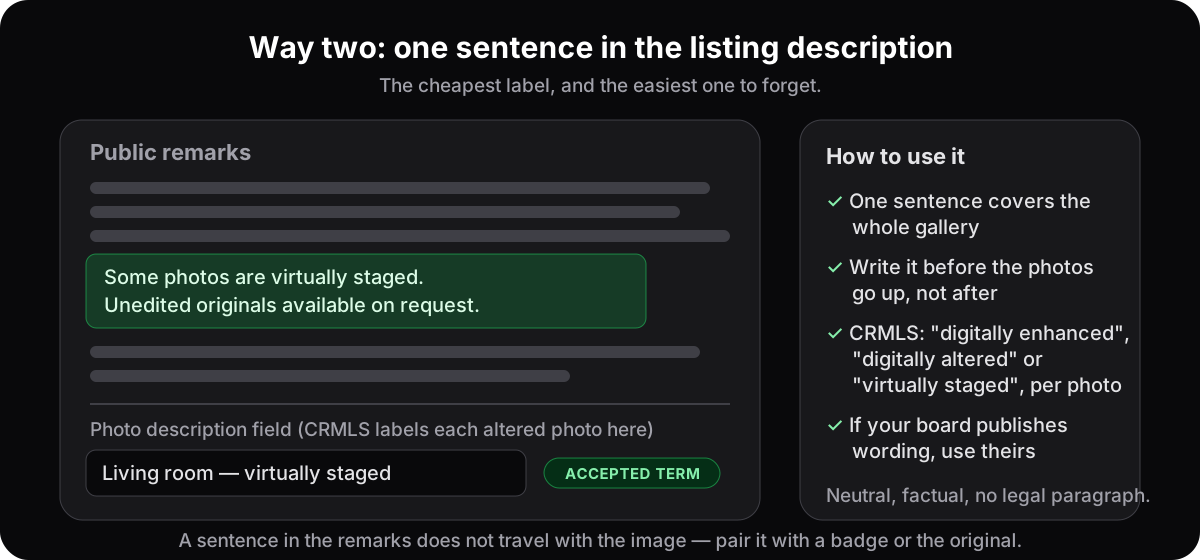
One sentence in the public remarks covers the whole gallery: "Some photos are virtually staged. Unedited originals are available on request." It is the cheapest label and the easiest to forget, so write it before the photos go up, not after. CRMLS is more specific: the label goes in the description field of each altered photo, using one of the labels rule 11.5.2 lists: "Virtually Staged", "Digitally Altered", "AI Altered" or "Photo Modified". If your board gives you wording, use theirs.
3. The original beside the staged photo
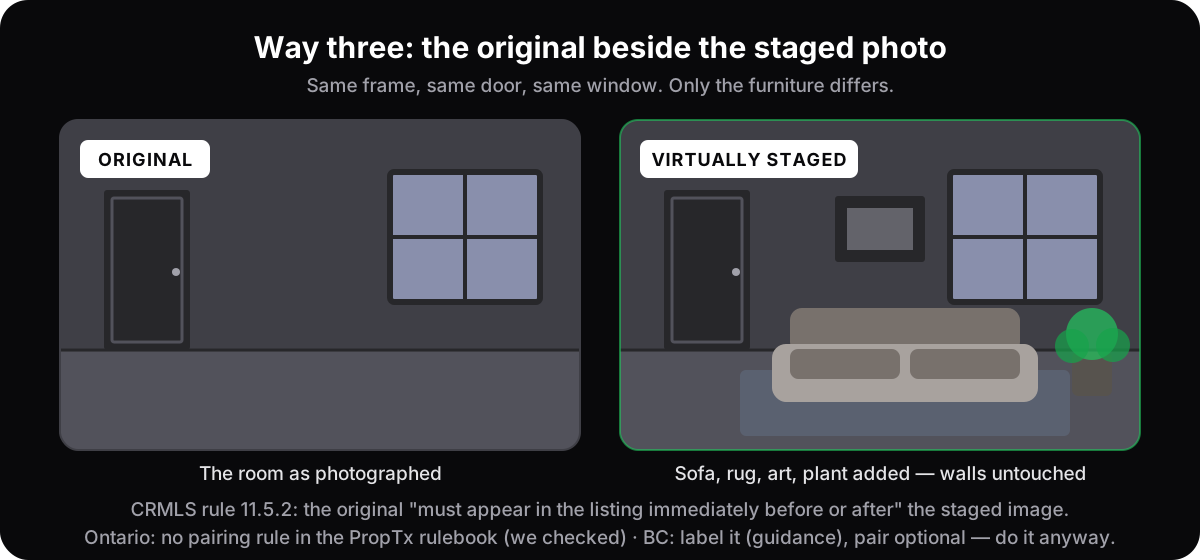
The most transparent option, because it makes the label almost redundant: the buyer sees exactly what is furniture and what is architecture. CRMLS makes it mandatory — rule 11.5.2 wants the original "displayed in the listing immediately before or after the digitally altered image" — and so do upstate New York's Alliance MLS rules, which want it directly before, Austin's Unlock MLS, which wants "a non-virtually staged image of the same view", and Arizona's ARMLS, which wants it directly before or after, and Georgia MLS, whose photo policy of 9 September 2020 wants it "immediately before or immediately after" the staged image; Colorado's elevateMLS wants the unaltered original "uploaded" as well, without saying where. Ontario has no pairing rule, and neither do Illinois's MRED, Bright MLS, Georgia's FMLS and Hive MLS, or Colorado's REcolorado and IRES; we read all seven rulebooks to check. BC asks for a label and leaves the pair to you. Do it anyway. The original is also your answer when a buyer asks whether the window was really that size — see what a buyer can demand from a virtually staged listing.
What may you change, and what must never be touched?
You may furnish; you may not alter. Furniture, rugs, art, plants and lamps are movable and leave with the seller, so the buyer loses nothing by seeing them. Windows, doors, walls, ceilings, floors, fixtures, damage and the view are what the buyer is paying for. Changing any of them is misrepresentation, and a label does not cure it.
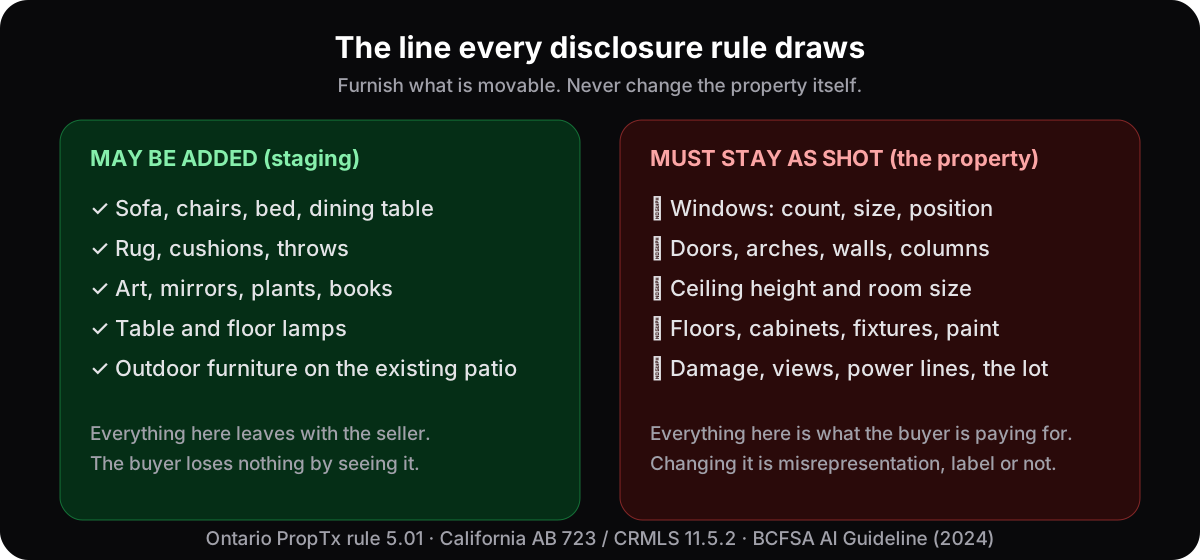
Generally fine, with disclosure:
- Adding furniture, rugs, art, plants and lamps to an empty or sparse room.
- Applying one coherent style so buyers can picture the room in use — the styles library runs from bright Scandinavian to quiet Japandi.
- Digitally removing the owner's clutter or furniture — but treat it as an alteration, because it is one. CRMLS says virtually clearing a room of furniture that will not stay at closing "is also considered digitally altered". Label it and keep the original.
- Placing outdoor furniture on the existing patio or deck. The furniture, not the garden: CRMLS does not permit AI-generated landscaping in the MLS, and AB 723 lists landscape and hardscape among the elements whose alteration triggers disclosure.
Never acceptable, label or not:
- Hiding or erasing defects. Water stains, cracks, mould, damaged flooring, a sagging ceiling: these are material facts. Painting over them in software turns a marketing photo into a misrepresentation claim.
- Changing the architecture. No added or removed windows, no widened rooms, no deleted support column, no invented fireplace. If it changes what the buyer is purchasing, it is off limits.
- Faking the view, the light or the setting. Swapping the parking lot outside the window for a park, or rendering a north-facing room as sunlit. Ordinary exposure correction is excluded from AB 723's definition of an altered image; a rendered light source is not.
- Implying staged items convey. The furniture almost never comes with the house; do not present it as though it did.
The honest test is one question: would a buyer feel deceived standing in the room? If yes, the edit went too far, and no label fixes it. A well-built tool makes the line easy to hold. When you stage a room on AI Flip Room, the render keeps the real architecture — walls, windows, doorways, ceiling height, camera angle — and changes only the furnishings; why the geometry never moves explains how that is checked.
What does honest staging look like?
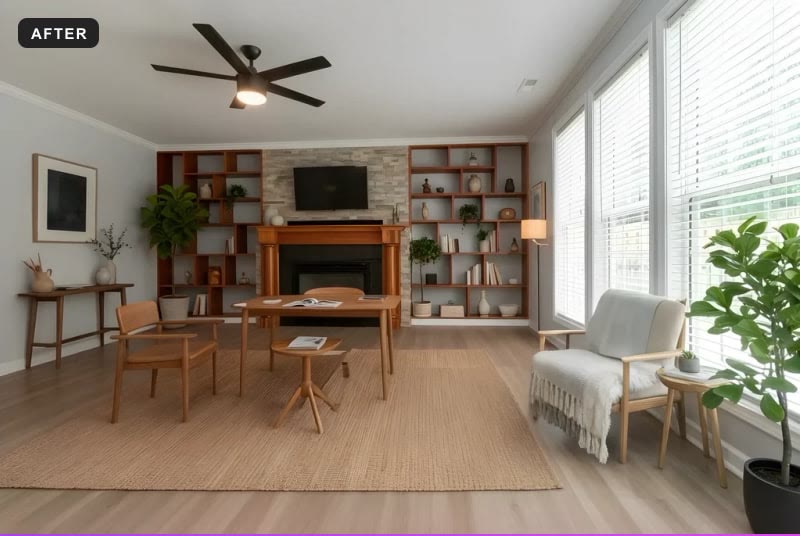
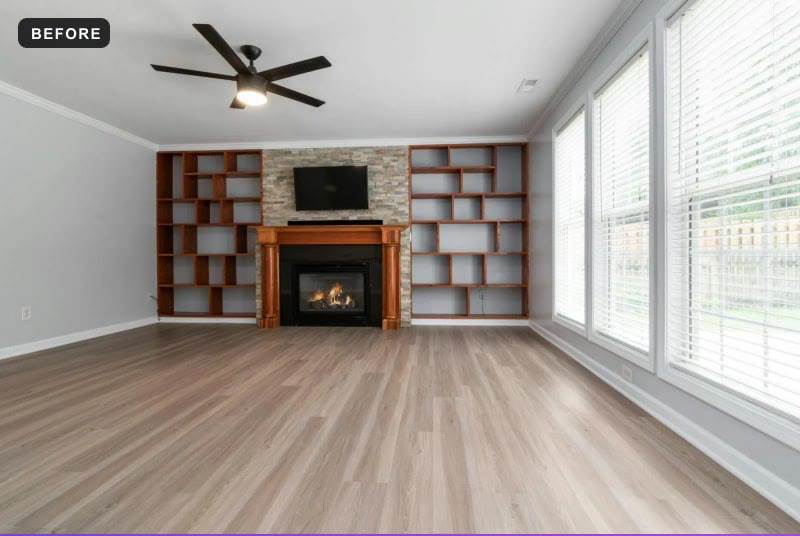
Look at the boring parts, not the furniture. In the pair below the fireplace surround, the stone, the built-in shelving, the windows and the ceiling fan are exactly where the photographer left them; the floor is the same floor. Everything new is movable and leaves with the seller — the test every staged photo should pass against its original.
What happens if you get it wrong?
It escalates. A brokerage or MLS compliance desk asks for a correction first. An MLS can then warn and fine; CRMLS's schedule is a warning, then $250. Above the MLS sits the regulator, whose rule is the ban on false or misleading advertising. Beside all of it stands the buyer who feels tricked at the door — the expensive one.
The escalation ladder, rung by rung
- 1A correction requestFrom your brokerage or the MLS compliance desk: add the label, add the original, or pull the image. Cheap if you kept the original file; awkward if you did not.
- 2An MLS warning, then a fineCRMLS spells out its schedule: a warning first, then a $250 fine if the listing is not corrected in a timely manner. Other boards set their own, and the rulebook tells you. The fine is rarely the expensive part.
- 3A complaint to the regulatorRECO in Ontario under the TRESA Code of Ethics; the Department of Real Estate in California, whose Real Estate Law AB 723 now sits inside; BCFSA in British Columbia under Rules section 41; the OACIQ in Quebec under section 112 of the brokerage Regulation; RECA in Alberta under section 42 of the Real Estate Act Rules; the Department of State in New York under Real Property Law section 441-c; the Florida Real Estate Commission under section 475.25(1)(c) of the Florida Statutes; the Texas Real Estate Commission under section 1101.652(b)(23) of the Occupations Code; the Washington Department of Licensing under RCW 18.85.361; the Arizona Department of Real Estate under rule R4-28-502; the Illinois Department of Financial and Professional Regulation under section 20-20 of the Real Estate License Act; the Maryland Real Estate Commission under section 17-322 of the Business Occupations and Professions article; Pennsylvania's State Real Estate Commission under section 604 of the Real Estate Licensing and Registration Act; the Virginia Real Estate Board under 18VAC135-20-190 and 18VAC135-20-300; the Georgia Real Estate Commission under rule 520-1-.09 and section 43-40-25 of the Official Code of Georgia; the Colorado Real Estate Commission under section 12-10-217 of the Colorado Revised Statutes and its rule 6.10.C. The common charge is false or misleading advertising, and discipline attaches to the licence, not the listing.
- 4The buyer's remedyA buyer who feels tricked walks, renegotiates, or brings a misrepresentation claim. Once a staged photo changed the property — a window, a ceiling, the light — the label is no defence, because disclosure covers that the image was edited, not what was changed.
- 5Reputation"That agent's photos don't match the house" is a hard sentence to shake in a referral business, and it travels faster than any fine. Buyers compare staged photos with the room at the door, and they talk.
None of this should scare you off virtual staging. It shows how cheap compliance is next to the cost of a slip: a visible label, the original kept, and a little restraint remove almost all of the downside.
What does a compliant workflow look like?
Five habits, none of which slow a listing down: photograph the room honestly, stage only what should be staged, keep the original of every staged frame, label every enhanced image in at least two of the three ways above, and check your own board's wording before you publish. Done this way, staging informs a buyer without misleading them.
- Photograph the room honestly and well. Good source photos produce better renders and give you a real before shot — see how to photograph rooms for virtual staging.
- Stage only what should be staged. Furnish and style; leave defects, structure and the light alone. The showcase gallery shows what restrained, realistic staging looks like.
- Keep the original. Save the untouched photo at full size so you can pair it with the staged version, link to it where the statute requires, and answer any question at a showing.
- Label every enhanced image. Badge, remark, pair — at least two, in your board's wording if it has one. And label them all: one unlabelled frame in a labelled gallery reads as the truth.
- Confirm your local rules. Skim your MLS handbook and ask your broker whenever you are unsure.
If you list for a living, the agents page shows how the tool fits into that routine, and the listing agent's workflow walks through it room by room. New to the idea altogether? Start with what virtual staging is, then what it costs and whether it actually sells homes.
Questions agents ask
Do you have to disclose virtual staging?+
In California, yes, by statute: AB 723 requires a conspicuous statement that the image was altered plus a link to the original, CRMLS adds a label in the photo description, and in Los Angeles The MLS™/CLAW asks for the image to be marked "altered", "digitally altered", "AI altered" or similar. In British Columbia the regulator says you should label altered photos. In Quebec the regulator's guideline sets a minimum: a clear, visible statement that the image was generated with AI. In Alberta the provincial MLS rules require virtually staged images to be disclosed in the listing's public remarks. In upstate New York the Alliance MLS rules require a "Virtually Staged" text overlay on the photo itself. In Florida, Stellar MLS requires "Virtually staged" in the photo description and public remarks that open with "One or more photo(s) was virtually staged.", and bans words on the photo. In Texas, Houston's HAR wants the note in the Photo Description, San Antonio's SABOR a pick-list option, and Austin's Unlock MLS an unstaged image of the same view. In Washington no published rule prescribes a label; the duty not to mislead does the work, and NWMLS's members-only rulebook reportedly asks for a "virtually staged" label. In Arizona, ARMLS requires its own "Digitally Altered" watermark on the photo, applied in Flexmls, and Tucson's MLSSAZ a "virtual staged" disclosure along the top of the image. In Illinois, MRED wants a Y in its field "Are Any Property Photos Virtually Staged?" and keeps text, logos and branding off the photo. On Bright MLS, in Maryland, Pennsylvania, Virginia and DC, the Private and Public Remarks must say the image is "virtually staged or digitally modified", and added text stays off the photo. In Georgia, FMLS, Georgia MLS and Hive MLS all want it in the public remarks; FMLS bans text on the photo and Georgia MLS bans watermarks, while Hive MLS also wants "either text on the photo or in its description". In Colorado, elevateMLS wants the exact phrase "Virtually Staged" in the Property Description and the Photo Remarks and adds its own watermark, while REcolorado and IRES ask for no label at all. Ontario's MLS rulebook has no label rule for staged images, but its accuracy test and the Code of Ethics still apply, and a label costs nothing. Label everywhere.
What should a virtual staging disclosure say?+
"Virtually staged" is enough for a badge or a caption. CRMLS rule 11.5.2 lists "Photo Modified", "Virtually Staged", "Digitally Altered" or "AI Altered" for the photo description. In California the statement must also say where the unaltered original can be seen, by URL or QR code. Keep it neutral and factual, use the same wording on every staged frame, and if your board publishes its own phrase, use that.
Do the rules apply to my own website and social media?+
The statute and the regulator's rules do; the MLS rulebook does not. AB 723 covers any advertisement or promotional material, and on a website you control the unaltered version must be included or linked. BC's Rules govern all real estate advertising. Ontario's rule 5.01 reaches only images submitted to the MLS, but the Code of Ethics — no false, misleading or deceptive advertising — applies wherever you publish.
Do I have to show the original photo next to the staged one?+
In a CRMLS listing, yes: the unaltered original must appear immediately before or after the staged image, and the statute separately requires a link to it. On an upstate New York Alliance MLS, yes too: directly before it. On Austin's Unlock MLS, yes: "a non-virtually staged image of the same view". On Arizona's ARMLS, yes: directly before or after it, under rule 8.23. On Illinois's MRED, no: the rule asks for the field and nothing about an original. On Bright MLS, no: the rules ask for both remarks fields and nothing about an original. On Georgia MLS, yes, under its photo policy of 9 September 2020: "immediately before or immediately after" the staged image; on FMLS and Hive MLS, no. On Colorado's elevateMLS, yes in the listing: the original "must also be uploaded", though the rule does not say where; on REcolorado and IRES, no. Ontario has no pairing rule — we read the rulebook to check, and the claim you may have seen came from California. BC asks for a label, not a pair. Show the original anyway; it is the most persuasive disclosure there is.
Does a "virtually staged" label make any edit acceptable?+
No. The label discloses that editing happened; it does not license changing the property. CRMLS says users cannot add, remove or modify any real part of a property. Ontario bans altered images that do not accurately depict the property regardless of labelling. BCFSA's advertising guidance says removing power lines or changing any physical characteristic that misrepresents the property is not acceptable. Furnish; never alter.
This is not legal advice. Rules change; the articles on each jurisdiction linked above quote the primary sources and say what we did and did not verify. Last checked against the PropTx MLS Rules effective 2 December 2024, the chaptered text of AB 723, CRMLS rule 11.5.2 (effective 10 July 2026) and its published guidance, and BCFSA's Artificial Intelligence and Advertising Guidelines.
See it on your own room
Upload a photo and watch AI restage your space in 15–60 seconds, depending on how much detail it has — free to try, no credit card.
Try AI Flip Room freeGot a question about this?
Something unclear or not covered? Ask here. We read every question and answer the useful ones right in the article. Nothing you write is published.
Related reading
Ontario Virtual Staging Rules: PropTx MLS Rule 5.01, Quoted
Is virtual staging banned on the Ontario MLS? We read the PropTx rulebook: rule 5.01 quoted, the missing "one unstaged photo" rule, and where the line is.
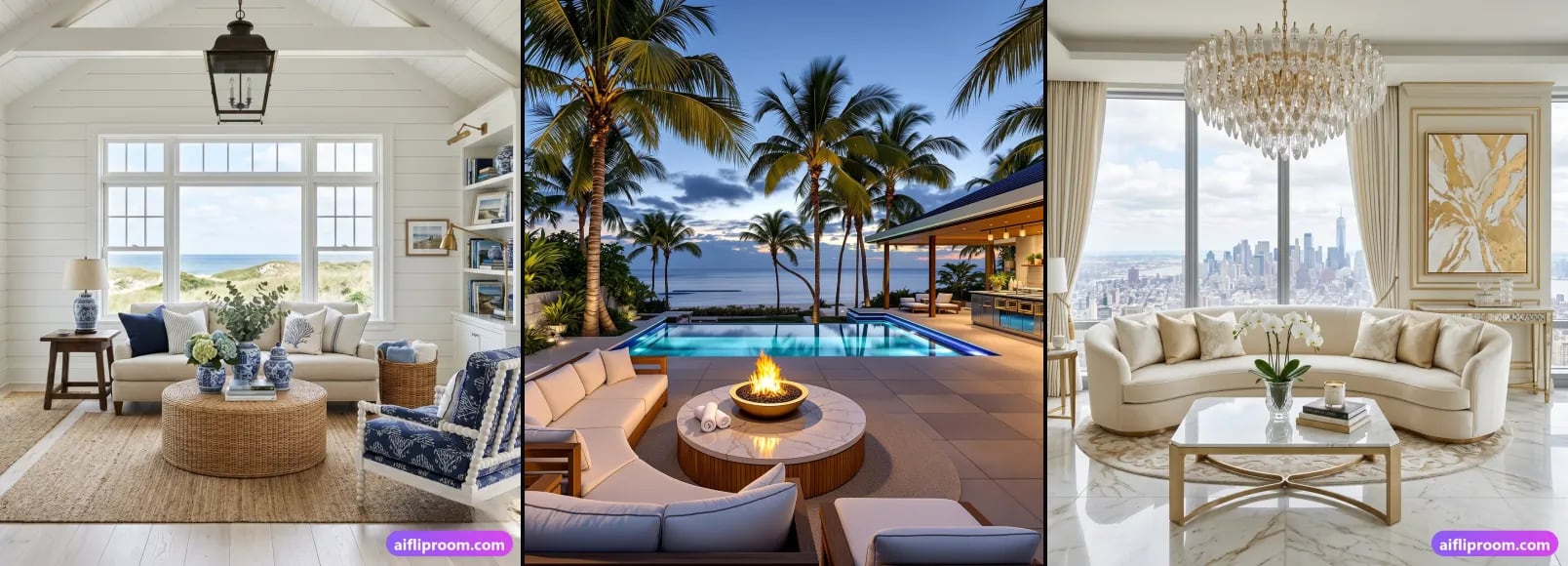
California Virtual Staging Rules: AB 723 + CRMLS 11.5.2
Since 1 January 2026 California regulates altered listing photos by statute. What AB 723 requires, what CRMLS 11.5.2 adds, the $250 fine, and a checklist.
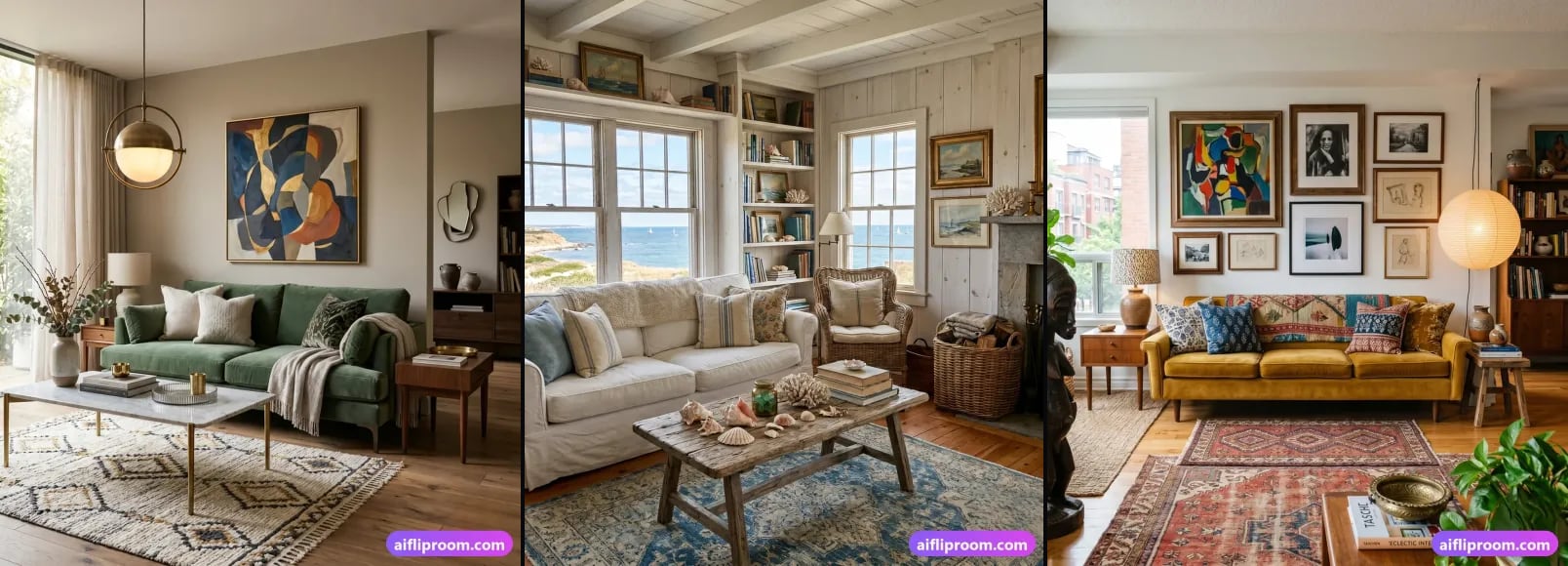
Virtually Staged Listing? 5 Things a Buyer Can Demand
AI staging is legal in Ontario, BC, Quebec, Alberta, California, New York, Florida, Texas, Washington, Arizona, Illinois, Georgia, Colorado and Bright MLS, with conditions: what a buyer can demand.