Redesign Your Kitchen From One Photo.
See your own kitchen with different cabinets, worktops and lighting in 15–60 seconds, depending on detail — before you call a fitter or pick a single sample.
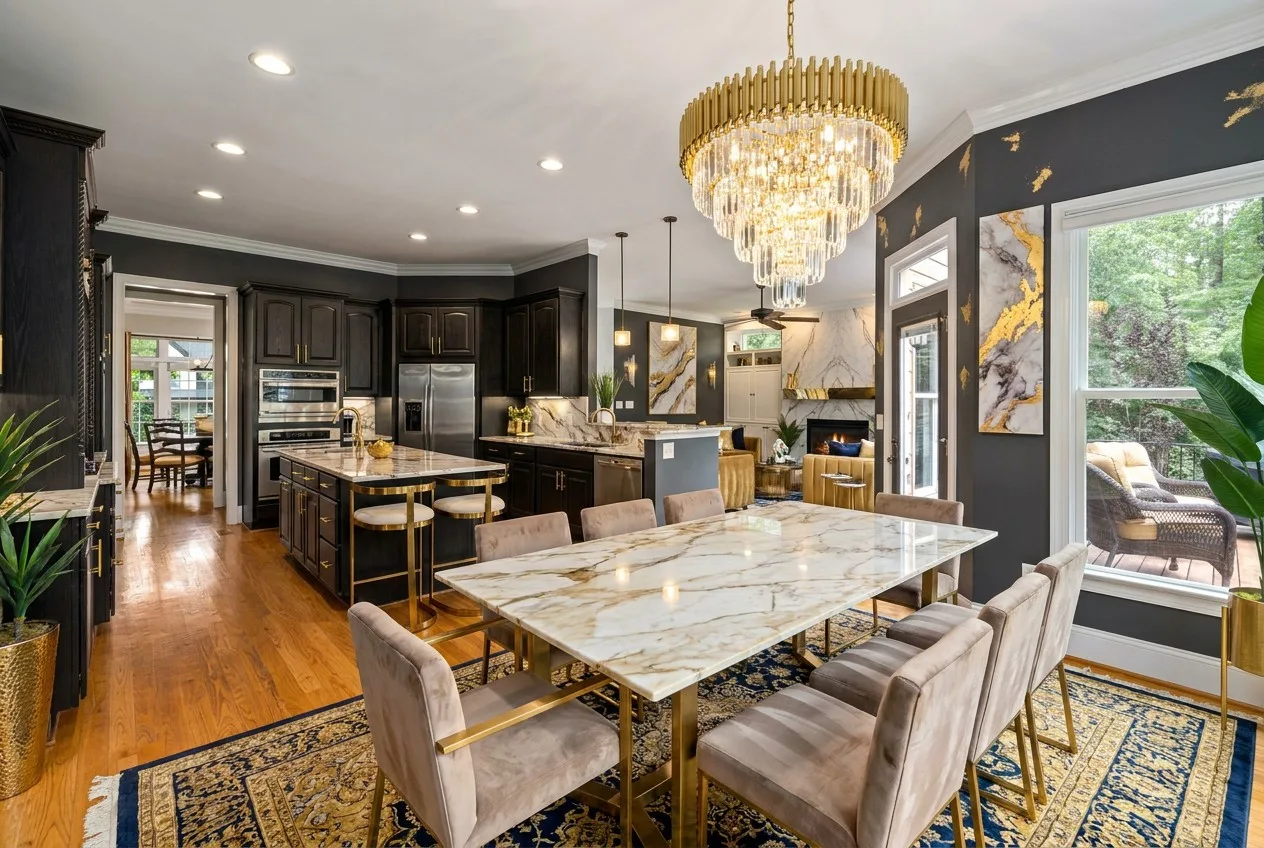
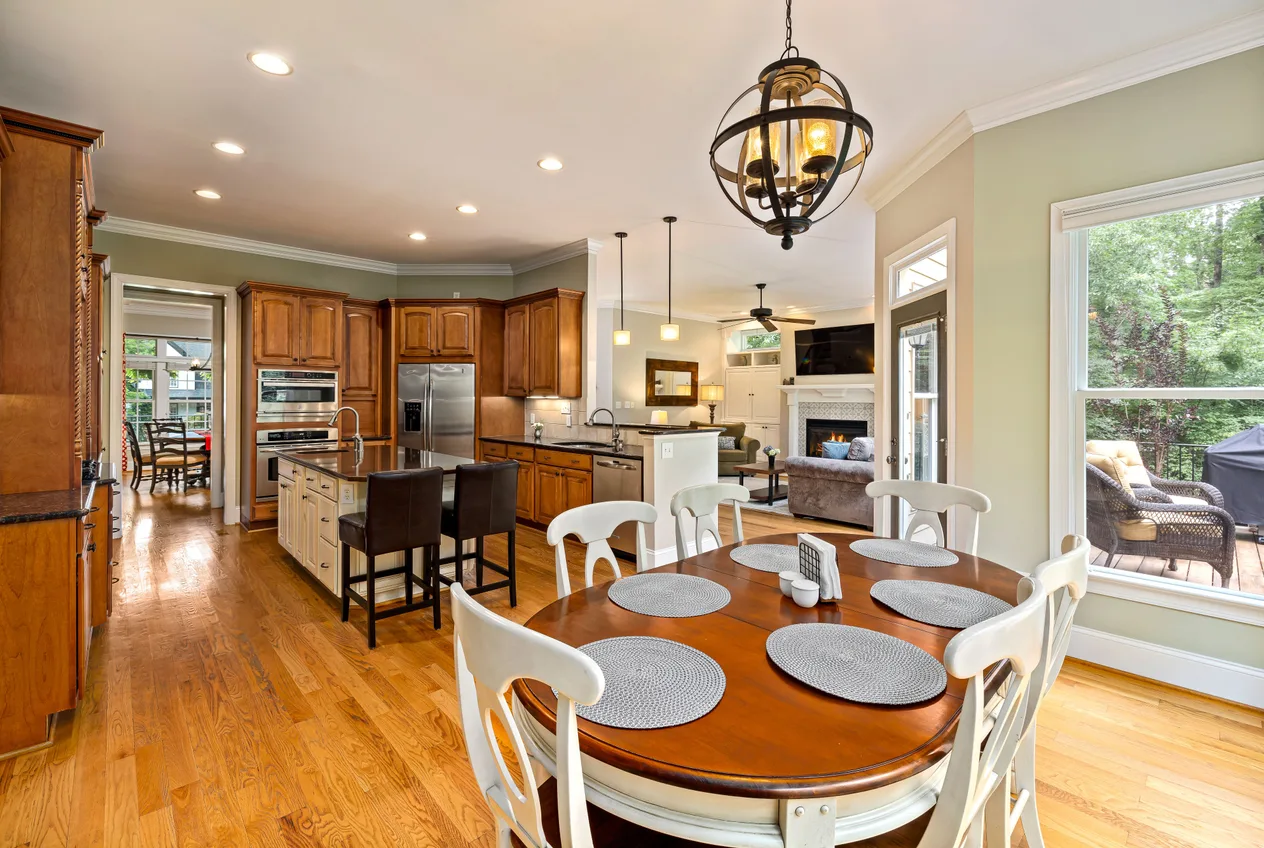
Same Kitchen, New Finish
Drag the slider. Both doorways, both sinks, the appliances and the worktop layout are where they were.
What the Render Changes
Cabinet fronts and colour
Dark wood to painted white, flat fronts to shaker, a two-tone island — the change most kitchens actually need.
Worktops, splashback, flooring
Stone, composite or timber surfaces, a different tile behind the hob, a new floor — all of it is finish, and all of it can change.
Lighting, stools and decor
Pendants over the island, bar stools, open shelving styling — the parts that make a kitchen photograph well.
And What Stays Put
A kitchen render that moves the plumbing is worthless. These are held on purpose.
- The sink and the wall above it
- Windows — the same number and size
- Doors and openings into other rooms
- The layout: island, run of units and appliance positions
Every render is quality-checked before you see it — a window that was never there is the single thing kitchens get wrong most often, so it is checked for by name. If the check rejects a render, you get the best attempt marked as a draft.
Start Free, Pay Only if You Want More
Free
Try it on your own room.
- 3 renders, for life
- No credit card
- Watermarked downloads
Room Pack
One listing, or one room you keep re-styling.
- 20 renders for $9Paid once. No subscription starts and nothing renews.
- No watermark tileJust a small “Virtually Staged” corner badge.
- They do not expireAn unused balance stays until you delete your account.
- Spent before your 3 free rendersThe free ones stay waiting for you.
- Buy another pack whenever you need more
Start free — the pack is offered in your account when you need more.
Pro
$39/mo billed annually · 250 renders a month
- Custom prompts in plain English
- Furnish Empty Room (5 a month)
- AI photo cleanup (5 a month)
- Outdoor and garden styles
- 2K downloads, no watermark
Kitchen Questions
Will it move my sink or add a window over it?
It should not — the sink and the wall above it are the one thing a kitchen render must leave alone, and an automatic check looks specifically for a window that was not in the original. If the check rejects a render, you still see the best attempt, clearly marked as a draft.
Can it change my cabinets and worktops?
Yes — cabinet fronts, colour, worktops, splashback, flooring, lighting and stools are exactly what the render changes. The positions of the units, the island and the appliances stay, so you can see your own kitchen in a different finish rather than a different kitchen.
How many styles can I try on the same photo?
50+ interior styles, one photo. Most people try three or four and keep one — a calm pale kitchen, a dark dramatic one and something in between tell you more than a long list.
What kind of photo works best?
A horizontal photo from the doorway or a corner, with the lights on and the worktops clear. Kitchens are the hardest room for AI staging, so a clean, well-lit, wide shot makes a visible difference to the result.
How much does it cost?
3 free renders for life, no credit card. A one-time Room Pack adds 20 renders for $9 with no subscription. Pro is $39 a month billed annually for 250 renders a month.
Is this a renovation plan?
No — it is a picture, not a drawing. Use it to decide on a direction and to show a kitchen fitter or designer what you are after; the measurements and the plumbing are their job.
See Your Kitchen in a New Finish
One photo, a few styles, and a clear idea of what to ask for.