See Your Room in a New Style From One Photo.
Upload a photo of the room you live in, pick a style, and see it redesigned in 15–60 seconds, depending on detail. Walls, windows and doorways stay where they are — only the furniture and finishes change.
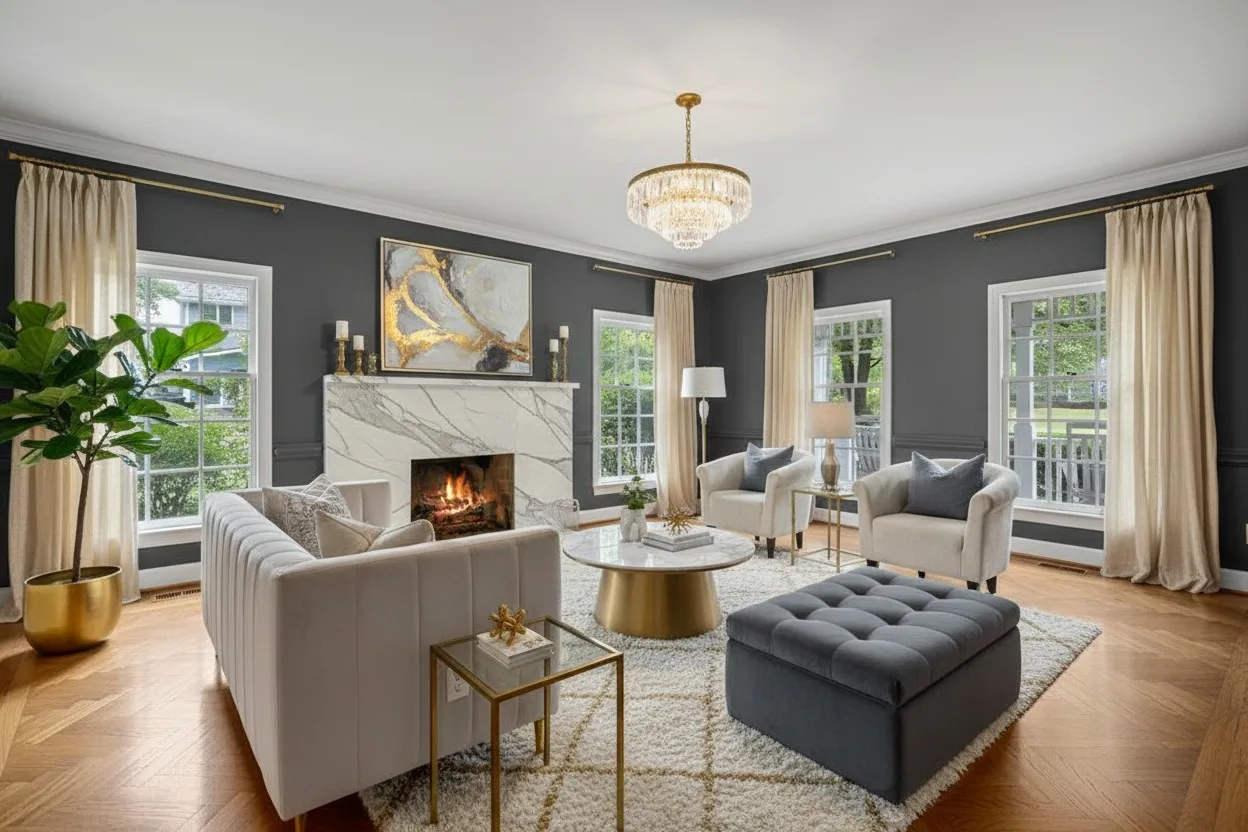
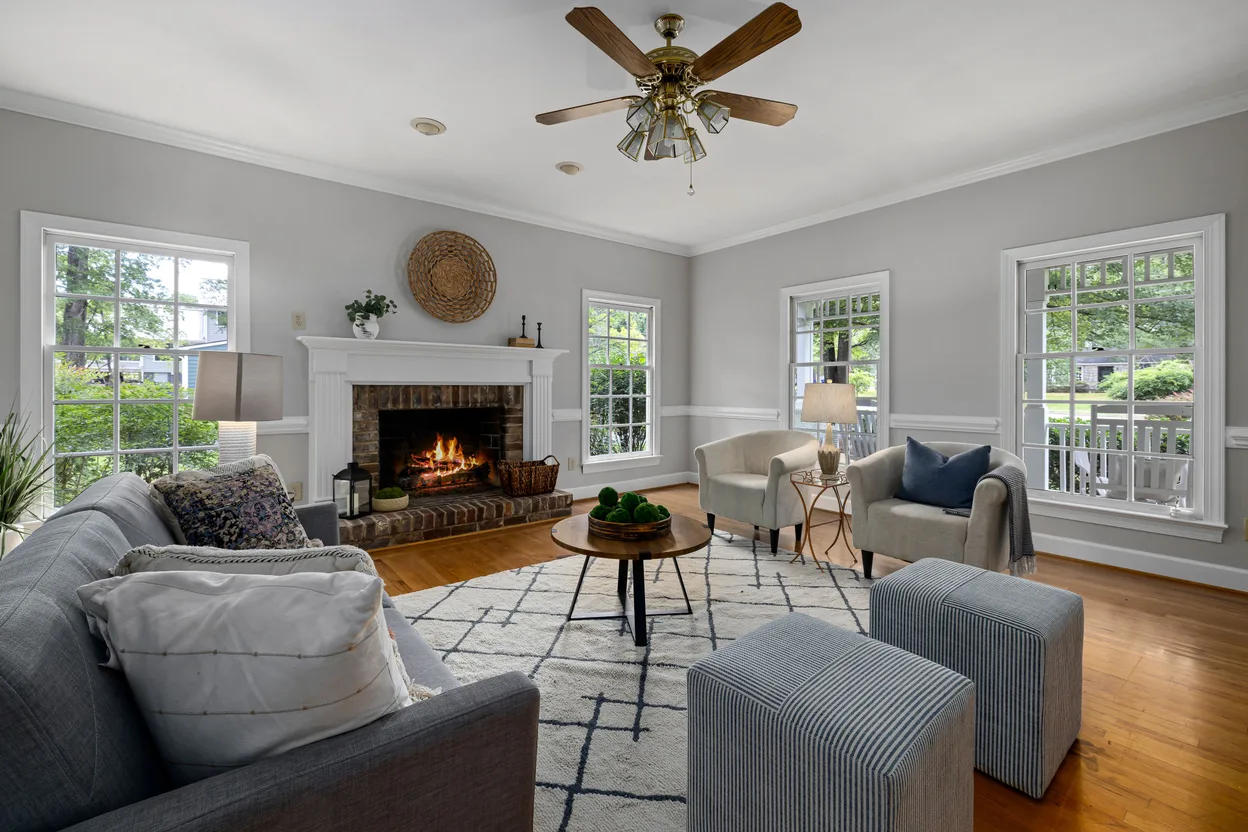
Same Room, New Style
Drag the slider. The walls, the four windows and the fireplace did not move.
Three Steps, One Photo
Snap your room
Furnished, half-finished or mid-renovation — any photo of the room from your phone works. Hold the phone sideways and stand in a corner for the best result.
Try the styles
Pick from 50+ interior styles — Scandinavian, Japandi, Modern Farmhouse and more — and see each one on your own room.
Decide, then spend
Keep the version you love and bring it to the store, your designer or your contractor as a picture of what you actually want.
Decide Before You Spend
Before you buy furniture
See how a sofa, a bed or a dining table of that size sits against your own window and doorway. The pieces are generated, but the proportions tell you something real.
Before you repaint
Try the room in a lighter or a darker palette before you buy a single tin of paint — the render changes wall colour and finishes along with the furniture.
Before you call a contractor
A picture of the finished room is a clearer brief than a Pinterest board. Everyone starts from the same image of your actual space.
What Changes and What Stays
Stays
- Walls and ceiling height
- Windows — the same number and size
- Doors, arches and built-ins
- The camera angle
Changes
- Furniture and decor
- Rugs, lighting and art
- Wall colour and finishes
- The overall style
Every render is quality-checked before you see it. If the check rejects one, you still get the best attempt — clearly marked as a draft.
Start Free, Pay Only if You Want More
Free
Try it on your own room.
- 3 renders, for life
- No credit card
- Watermarked downloads
Room Pack
One listing, or one room you keep re-styling.
- 20 renders for $9Paid once. No subscription starts and nothing renews.
- No watermark tileJust a small “Virtually Staged” corner badge.
- They do not expireAn unused balance stays until you delete your account.
- Spent before your 3 free rendersThe free ones stay waiting for you.
- Buy another pack whenever you need more
Start free — the pack is offered in your account when you need more.
Pro
$39/mo billed annually · 250 renders a month
- Custom prompts in plain English
- Furnish Empty Room (5 a month)
- AI photo cleanup (5 a month)
- Outdoor and garden styles
- 2K downloads, no watermark
Questions Homeowners Ask
Does it work on a furnished room, or only on empty ones?
Furnished rooms are exactly what it is built for: the render replaces your furniture and decor with the style you pick and keeps the room itself. For a completely empty room there is a dedicated Furnish Empty Room mode on Pro.
Will it change my walls, windows or doors?
It should not. Walls, windows and doorways are meant to stay exactly where the camera found them, and every render goes through an automatic check that looks for moved or missing openings. If the check rejects a render, you still see the best attempt, clearly marked as a draft.
How much does it cost?
Every account gets 3 free renders for life, no credit card; free downloads carry a watermark. A one-time Room Pack adds 20 renders for $9 with no subscription, no watermark tile and just a small “Virtually Staged” corner badge. Pro is $39 a month billed annually for 250 renders a month.
Can I remove furniture or describe my own changes?
Yes, on Pro. Custom prompts let you write the change in plain English, and AI photo cleanup erases objects you brush over — 5 cleanups a month on Pro, 100 on Agency. The free renders and the Room Pack restyle the whole room in the style you pick.
Can I buy the furniture I see in the render?
No — the pieces are generated, not taken from a catalogue. Use the render to decide on size, colour and layout, then shop for pieces that match.
What kind of photo works best?
A horizontal photo taken from a corner at chest height, with the lights on and some floor and ceiling in the frame. A screenshot of a listing or a narrow vertical shot gives the AI less of the room to work with.
See Your Room Before You Change It
One photo, a few styles, and a clear picture of what you actually want.