Free AI Virtual Staging for Listing Agents — With the MLS Label Rules Built In.
Every account gets 3 free renders — no credit card, and they never reset. Upload a listing photo, pick one of 50+ interior styles, and get the staged room in 15–60 seconds, depending on detail. Then label it the way your MLS asks: this page lists the “Virtually Staged” rules of 15 US and Canadian markets, copied from our published guides, with a free wording tool and the one habit that keeps a render listing-safe — checking it against the original.
An Empty Bedroom, Staged for the Listing
The same room in the Modern style. The window, the door, the ceiling light, the grey walls and the carpet are where the photo had them; a bed, a rug, lamps, art and a plant are added — the kind of change staging may make.
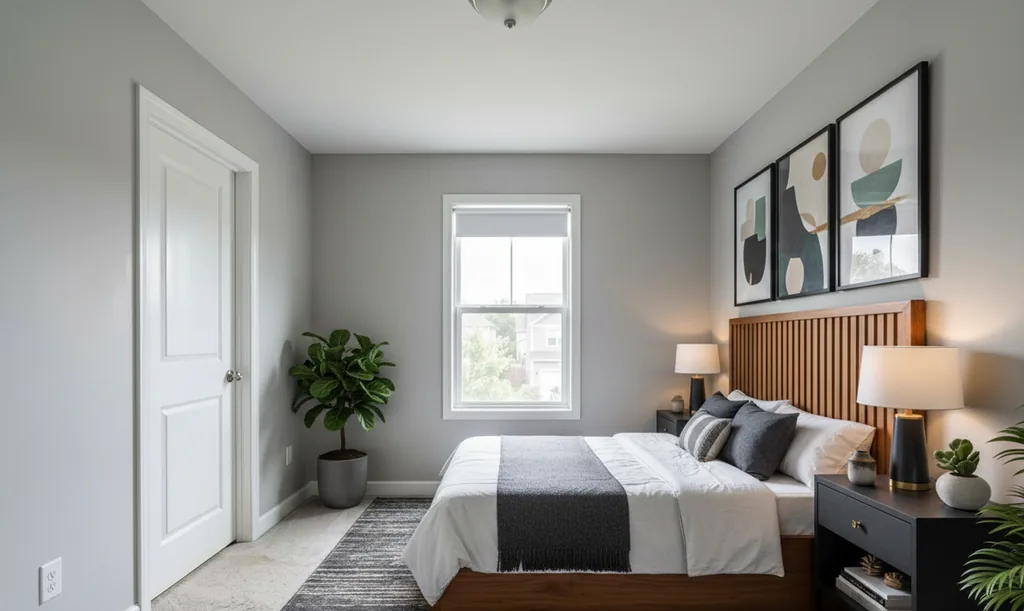
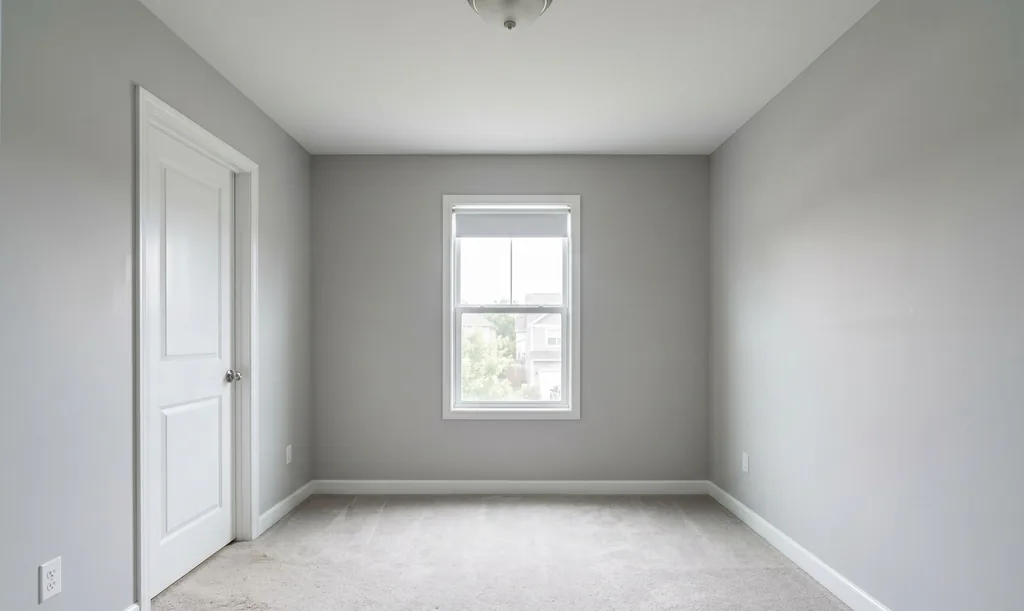
Shown without the watermark that free downloads carry. We checked this pair against its original the way the rules ask you to check yours — see “Check every render” below.
From Listing Photo to Labelled Render
Three steps. The third one is the part a buyer, a broker and your MLS care about.
Upload the listing photo
Any room photo — empty or furnished, from your phone or the photographer. Shoot it level, at chest height, in daylight with the lamps off: staging furnishes the photo it is given and cannot fix a tilted or stretched one.
How to photograph a room for stagingPick a style, get the render
50+ interior styles — the tool reads the room and suggests one that suits it. The render arrives in 15–60 seconds, depending on detail, after an automatic check that looks for moved or missing doors and windows.
Add the label, keep the original
Put the words your MLS names where its rule says — the photo description, the public remarks, a checkbox or the photo itself — and keep the untouched photo at full size so you can pair it where the rule requires. Our renders carry a “Virtually Staged · AI Flip Room” badge; on paid renders you can switch it to a brand-free “Virtually Staged.” or turn it off. Some MLSs ban text on listing photos, so check before you add a badge.
Get the exact words for your MLSThe “Virtually Staged” Rules, Market by Market
32 rulebooks and regulators across 15 markets. Every line is copied from the guide it links to, which quotes the rule and says what we could not verify. Not legal advice — your MLS handbook and your broker are the final word.
| MLS or regulator | Label | Where it goes | Original beside it | Words on the photo | Rule |
|---|---|---|---|---|---|
| California · United States | |||||
| CRMLS | Label required“Virtually Staged” | Photo description field | Required, right next to the staged photo | Not required: the label goes in the listing fields | rule 11.5.2Read the guide |
| The MLS™/CLAW (Los Angeles) | Label required“Digitally Altered” | The rule does not say where | A link to the original is required; no pair | No rule against a plain label | rule 11.5.1Read the guide |
| New York · United States | |||||
| Upstate: the New York State Alliance of MLSs | Label required“Virtually Staged.” | On the photo itself | Required, right next to the staged photo | Required on the photo | Section 1.2, item 3 (Photos)Read the guide |
| New York City: REBNY's RLS | No label required by the MLS rules“Virtually staged” | Photo description field, Public remarks | No pairing rule | Restricted: ask your MLS before adding text | 19 NYCRR 175.25(c)(9)Read the guide |
| Long Island and the Hudson Valley: OneKey® MLS | Not verified: we have not read this rulebook“Virtually staged” | Photo description field, Public remarks | Not verified | Not verified | section 307, Accurate Images and AttachmentsRead the guide |
| Florida · United States | |||||
| Stellar MLS | Label required“Virtually staged” and “One or more photo(s) was virtually staged.” | Photo description field, Checkbox or pick list, Public remarks | No pairing rule | Banned: no words on the photo | Article 04.04, Disclosure RequirementsRead the guide |
| SEFMLS (Miami) | No label required by the MLS rules“Virtually staged” | Photo description field, Public remarks | No pairing rule | Banned: no words on the photo | rule 15.1.12Read the guide |
| BeachesMLS | Label required“Virtually staged” | Public remarks, Photo description field | No pairing rule | Banned: no words on the photo | section 3.2.2Read the guide |
| realMLS (Northeast Florida) | Label required“Virtually staged” | Public remarks, Photo caption | Required in the listing; the rule does not say where | Restricted: ask your MLS before adding text | Section 1.2.0Read the guide |
| Texas · United States | |||||
| HAR (Houston) | Label required“Virtually staged” | Photo description field | Only when the property itself is altered | Not required: the label goes in the listing fields | Rule 1.25.1Read the guide |
| NTREIS (Dallas–Fort Worth) | No label required by the MLS rules“Virtually staged” | Photo description field | No pairing rule | Restricted: ask your MLS before adding text | rule 7.30Read the guide |
| Unlock MLS (Austin) | No label required by the MLS rules“Virtually staged” | Photo description field | Required in the listing; the rule does not say where | Restricted: ask your MLS before adding text | Rule 2.15, Digital ImagesRead the guide |
| SABOR (San Antonio) | Label required | Checkbox or pick list | No pairing rule | Not required: the label goes in the listing fields | section 1.2(b)Read the guide |
| Washington · United States | |||||
| NWMLS (most of the state) | Not verified: we have not read this rulebook“virtually staged” | Photo description field | Not verified | Not verified | Rule 105(d) (reported, not verified)Read the guide |
| Spokane MLS | No label required by the MLS rules“Virtually staged” | Photo description field | No pairing rule | Not addressed by this rule | form RE-620-400Read the guide |
| Arizona · United States | |||||
| ARMLS (Arizona Regional MLS) | Label required“Virtually staged” | On the photo itself, Photo description field | Required, right next to the staged photo | Required on the photo | Rule 8.23(n)Read the guide |
| MLSSAZ (Tucson) | Label required“Virtually Staged” | On the photo itself | Required, right next to the staged photo | Required on the photo | section 1.19(I)Read the guide |
| Illinois · United States | |||||
| MRED (Chicago area) | Label required“Some photos are virtually staged” | Checkbox or pick list, Public remarks | No pairing rule | Restricted: ask your MLS before adding text | section 6.2.3Read the guide |
| MARIS (Metro East) | No label required by the MLS rules“Virtually staged” | Public remarks | Only when the property itself is altered | Banned: no words on the photo | photo and video standardsRead the guide |
| Maryland, Pennsylvania, Virginia & DC · United States | |||||
| Bright MLS | Label required“Some photos are virtually staged.” | Private remarks, Public remarks | No pairing rule | Banned: no words on the photo | Appendix D, item 8Read the guide |
| Georgia · United States | |||||
| FMLS (Atlanta) | Label required“One or more photos are virtually staged.” | Public remarks | No pairing rule | Banned: no words on the photo | rule 20.1(e)Read the guide |
| Georgia MLS (GAMLS) | Label required“One or more photos are virtually staged.” | Public remarks | Required, right next to the staged photo | Banned: no words on the photo | photo policy of 9 September 2020Read the guide |
| Hive MLS (Savannah, Augusta, Athens) | Label required“One or more photos are virtually staged.” and “Virtually Staged” | Public remarks, On the photo itself, Photo description field | No pairing rule | Allowed | Exhibit 3Read the guide |
| Colorado · United States | |||||
| REcolorado (Denver area) | No label required by the MLS rules“One or more photos are virtually staged.” | Public remarks | No pairing rule | Allowed | section 1.20Read the guide |
| IRES (Northern Colorado) | No label required by the MLS rules“One or more photos are virtually staged.” | Public remarks | No pairing rule | No rule against a plain label | section 1.2.0Read the guide |
| elevateMLS (Colorado Springs; formerly Pikes Peak MLS) | Label required“Virtually Staged” | Checkbox or pick list, Listing description, Photo description field | Required in the listing; the rule does not say where | Banned: no words on the photo | Appendix E, item 23Read the guide |
| Ontario · Canada | |||||
| PropTx MLS® | No label required by the MLS rules“Virtually staged” | On the photo itself, Photo caption | No pairing rule | No rule against a plain label | rule 5.01(a)Read the guide |
| ITSO MLS® (Cornerstone and Brantford) | Label required“Virtually staged” | Public remarks, On the photo itself | No pairing rule | Allowed | rule 2.15(d)Read the guide |
| British Columbia · Canada | |||||
| BCFSA guideline (the regulator) | Regulator guidance: label it“Virtually staged” | On the photo itself, Listing description | No pairing rule | Not addressed by this rule | part 1, "Advertising Considerations"Read the guide |
| Alberta · Canada | |||||
| Alberta MLS® rules (all ten boards) | Label required“Some photos are virtually staged.” | Public remarks | No pairing rule | Restricted: ask your MLS before adding text | 2.04 gRead the guide |
| Quebec · Canada | |||||
| OACIQ guideline (the regulator) | Label required“Image générée par l'intelligence artificielle” and “Image generated by artificial intelligence” | On the photo itself, Photo caption | Keep it on file; not required beside the photo | Allowed | 6.3.1Read the guide |
| Rest of Canada · Canada | |||||
| Rulebooks we have not read | Not verified: we have not read this rulebook“Virtually staged” | Check your board's rulebook | Not verified | Not verified | Read the guide |
Not on this list? Every rulebook we have read rests on one duty — do not advertise a property in a way that misleads — so label the photo, keep the original and ask your broker. Read the disclosure rules hub
Get the Exact Words for Your MLS
Pick the province or state and the MLS your listing is on. You get the words to label a virtually staged photo, where they go — on the photo, in the photo description, in the public remarks or in a checkbox — whether the unstaged original has to sit beside it, whether words on the photo are allowed, and the rule it all comes from, quoted. Free, no sign-up, and the words copy with one tap.
Open the disclosure wording toolCheck Every Render Before It Goes on the MLS
AI can repaint a wall or swap a light fixture — check every render against the original before it goes on the MLS.
What staging may change
Furniture, rugs, art, plants and lamps are movable and leave with the seller, so the buyer loses nothing by seeing them.
What must match the original
Windows, doors, openings, ceiling, floor, fixtures, the view and where the camera stood. If any of them changed, discard the render; a label does not fix it.
What the automatic check does, and what it does not
Every render — free or paid — goes through an automatic check that looks for moved or missing doors and windows and a changed camera angle; if it rejects one, you still see the best attempt, clearly marked as a draft. It is a filter, not a substitute for your eyes: open the render next to the original at full size before you upload it, and discard any frame where a fixed part of the room is not the same.
What you may change, and what must matchWhat a Listing-Ready File Costs
Free renders are for judging the tool on your own listings: every free render carries a tiled “AIFlipRoom.com” watermark and a corner badge. A listing photo needs a clean file, and the commercial license that covers MLS submissions comes only with paid renders — Room Pack, Pro or Agency.
- Room Pack — one listing$9 once for 20 renders that do not expire: no tiled watermark, a “Virtually Staged” corner badge you can switch off, and the same commercial license as Pro — listings for sale or rent, MLS submissions and listing portals.
- Pro — every listing$46 a month, or $39 a month billed annually, for 250 renders a month with a commercial license; Pro adds 2K downloads, the standard for MLS and brochures, custom prompts, AI photo cleanup and the Furnish Empty Room mode.
- Agency — a whole team$99 a month, or $89 a month billed annually, for 1,000 renders a month with the Agency commercial license and 4K lossless downloads.
Free
Try it on your own room.
- 3 renders, for life
- No credit card
- Watermarked downloads
Room Pack
One listing, or one room you keep re-styling.
- 20 renders for $9Paid once. No subscription starts and nothing renews.
- No watermark tileJust a small “Virtually Staged” corner badge, on by default and switchable.
- Commercial license, same as ProListings for sale or rent, MLS submissions and listing portals.
- They do not expireAn unused balance stays until you delete your account.
- Spent before your 3 free rendersThe free ones stay waiting for you.
- Buy another pack whenever you need more
Start free — the pack is offered in your account when you need more.
Pro
$39/mo billed annually · 250 renders a month
- Custom prompts in plain English
- Furnish Empty Room (5 a month)
- AI photo cleanup (5 a month)
- Outdoor and garden styles
- 2K downloads, no watermark
Questions Listing Agents Ask
Is AI virtual staging really free for listing agents?
Yes. Every account gets 3 free renders for life — not per month and not a timed trial — with no credit card, so nothing is ever charged for them. They are for judging the quality on your own listings: every free render carries a tiled “AIFlipRoom.com” watermark and a “Virtually Staged · AI Flip Room” badge in the corner, both baked into the file.
Can I put a free render on the MLS?
Not as it is: the tiled watermark covers the whole image, and the commercial license that covers MLS submissions comes only with paid renders — Room Pack, Pro or Agency. Whichever render you list, follow your MLS’s disclosure rule: some want a label on the photo, others a note in the description or remarks, and some ban any text on listing photos.
Find your MLS’s wordingDoes a Room Pack render come with a commercial license for listings?
Room Pack renders carry the same commercial license as Pro — listings for sale or rent, MLS submissions and listing portals — with no tiled watermark and a “Virtually Staged” corner badge you can switch off. 20 renders for $9, paid once, and they do not expire. Pro and Agency renders carry a commercial license too. You remain responsible for the disclosure rules of your MLS and your jurisdiction.
Compare every planWill the AI change my walls, windows or light fixtures?
It is not supposed to, and every render goes through an automatic check that looks for moved or missing doors and windows. But AI can repaint a wall or swap a light fixture — check every render against the original before it goes on the MLS. Count the windows and doors, look at the ceiling, the floor, the light fixtures and the view; they should match the original exactly. Only furniture, rugs, art and plants may differ.
What you may change, and what must matchDoes the badge on the render count as the disclosure?
Our renders carry a “Virtually Staged · AI Flip Room” badge; on paid renders you can switch it to a brand-free “Virtually Staged.” or turn it off. Some MLSs ban text on listing photos, so check before you add a badge. Where your MLS names the words and the field — the photo description, the public remarks, a checkbox — use those as well; the table on this page says which.
What wording should a virtual staging disclosure use?
The words your MLS names, where it names any. Upstate New York's Alliance MLSs require the overlay “Virtually Staged.” on the photo. Florida's Stellar MLS wants “Virtually staged” in the photo description and public remarks that open with “One or more photo(s) was virtually staged.” CRMLS in California lists “Photo Modified”, “Virtually Staged”, “Digitally Altered” or “AI Altered”. Arizona's ARMLS marks the photo with its own “Digitally Altered” watermark. Illinois's MRED wants a Y in its field “Are Any Property Photos Virtually Staged?”, not words on the photo. Bright MLS, in the Mid-Atlantic, wants it in both the Private and Public Remarks. In Georgia, FMLS, Georgia MLS and Hive MLS all want the fact in the public remarks and none prescribes the words; Hive MLS also wants text on the photo or in its description. In Colorado, only elevateMLS prescribes the words: the exact phrase “Virtually Staged” in the Property Description and the Photo Remarks, after which the MLS adds its own watermark; REcolorado and IRES ask for no label. Quebec's OACIQ gives “Image generated by artificial intelligence” as its example. Where no wording is prescribed, “Virtually staged” is enough for a badge or a caption.
Can I put “Virtually staged” on the listing photo itself?
Only where your MLS allows it. Upstate New York's Alliance MLSs require the label on the photo. Florida's Stellar MLS, SEFMLS and BeachesMLS ban text on listing photos. Alberta's rule 2.04 b bars any message other than “Sample Photo”, so the disclosure goes in the public remarks. In Ontario, ITSO's rule accepts a label on the image as one of its two ways. In Arizona, ARMLS allows only its own “Digitally Altered” watermark on the photo, and Tucson's MLSSAZ wants “virtual staged” along the top of the image. In Illinois, MRED keeps text commentary off photos and MARIS bans added text. Bright MLS bars added text and logos on photos. In Georgia, FMLS bans text superimposed on photos and Georgia MLS bans watermarks, while Hive MLS accepts a plain label on the image as one of its two ways. In Colorado, elevateMLS shows photos without any overlay or text except its own marks, and REcolorado allows a plain watermark as a non-predominant feature but bans company names on the photo. In Texas, NTREIS bans embellishments and Unlock MLS may remove stamped text. Check your MLS before you add a badge.
Do I have to show the unstaged original next to the staged photo?
Only where the rulebook says so. CRMLS in California wants it immediately before or after the staged photo; the upstate New York Alliance MLSs, directly before it; Austin's Unlock MLS, “a non-virtually staged image of the same view”; Arizona's ARMLS, directly before or after; Tucson's MLSSAZ, adjacent to it; Georgia MLS, immediately before or immediately after it; realMLS in Northeast Florida, submitted with the listing, without saying where; elevateMLS in Colorado, uploaded with the listing, without saying where. Ontario, British Columbia, Alberta, Stellar MLS, Illinois's MRED, Bright MLS, Georgia's FMLS and Hive MLS, and Colorado's REcolorado and IRES have no pairing rule. Keep the original everywhere; it is your answer if a buyer asks.
Does a label make any edit acceptable?
No. A label says that a photo was edited, not what changed. Furnish freely; never touch windows, walls, ceilings, floors, fixtures, damage or the view.
Guides to Read Next
- Virtual staging disclosure rules: the hub
- The listing agent’s virtual staging workflow
- What “virtually staged” means to a buyer
- What buyers can demand from a staged listing
- Virtual staging in Canada, province by province
- How to photograph a room for staging
- What the free renders include, and what they do not
- Virtual staging for real estate agents
Stage Your Next Listing Free
3 free renders, no card, and the label rules of 15 markets on one page. Label every staged frame, keep the original, and check the render before it goes up.