Free AI Virtual Staging — Forever.
Every account gets 3 free AI virtual staging designs — free forever. Not a trial: no countdown, no credit card, and the free designs never reset. Upload a photo of a furnished or empty room, pick from 50+ interior styles, and get it staged in 15–60 seconds, depending on detail. Want more later? A one-time Room Pack adds 20 renders for $9, with no subscription.
Drop your room photo here
or click to browse · JPG, PNG, WEBP · up to 15MB
By uploading you confirm you have the rights to modify this photo.
…and pick a look
🔥 The 12 looks our users pick most
3 free renders · No credit card · Results in 15–60 seconds
One Photo, Staged
An empty dining room staged in the Hamptons style. The bay windows, the coffered ceiling, the ceiling fan and the door stay — the table, chairs, rug, console and decor are added.
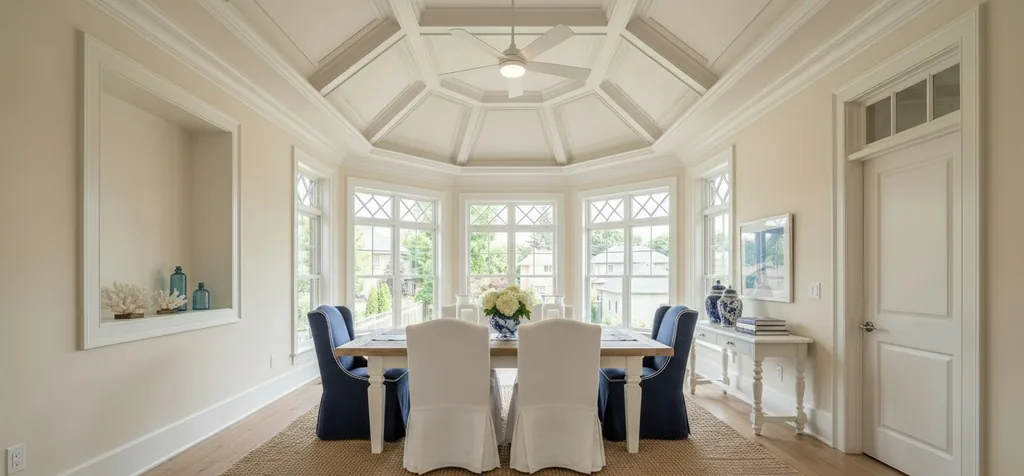
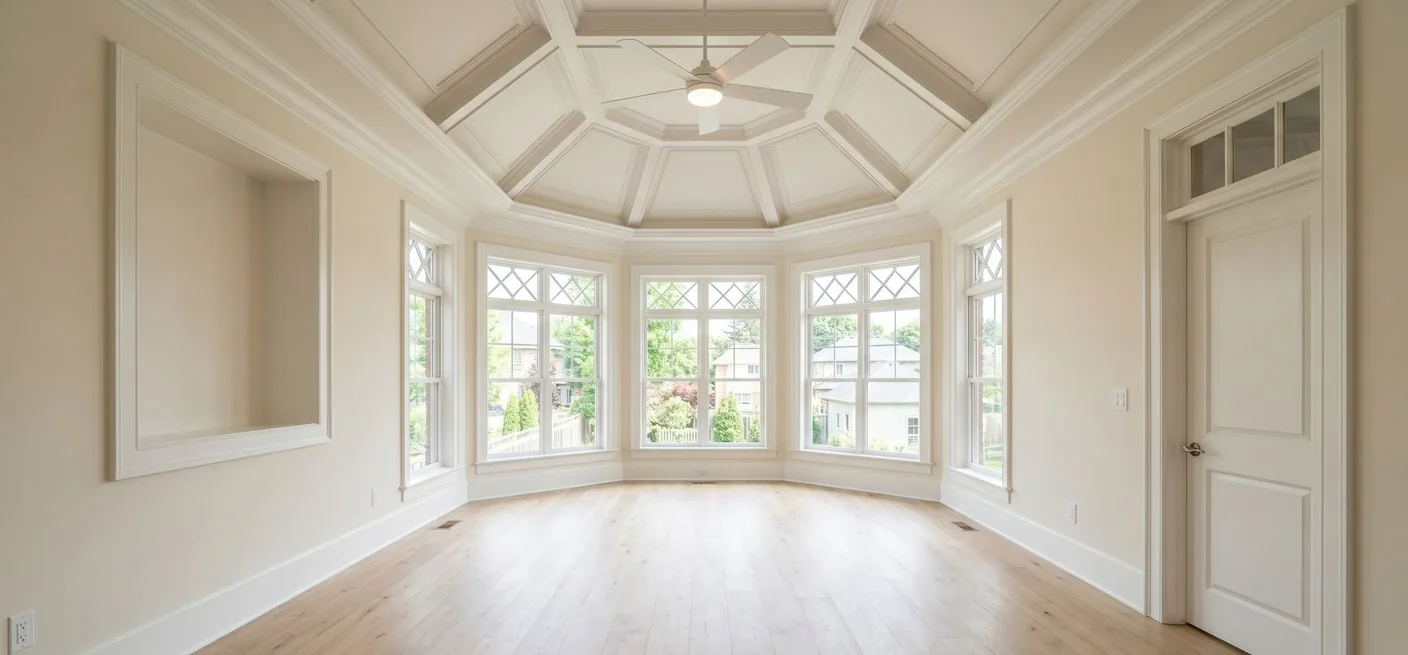
Shown without the watermark that free downloads carry — see the plan comparison below.
What’s Free — and What Isn’t
Included free
- 3 designs, free forever — they never reset
- No credit card, no trial countdown, nothing to cancel
- All 50+ interior styles
- Furnished and empty rooms — the restyle furnishes an empty room too
- The same automatic quality check as paid renders
Not included free
- Outdoor styles — Pro and Agency
- Furnish Empty Room mode with a density choice — Pro and Agency
- AI photo cleanup and custom prompts — Pro and Agency
- 2K and 4K downloads — Pro and Agency
- The commercial license — it comes with Room Pack, Pro and Agency renders
- A clean file — free renders carry a tiled watermark and a corner badge
How It Works
Create a free account
Sign up with Google or email. No credit card, so nothing is ever charged for the free designs.
Upload a photo, pick a style
Any room photo from your phone — furnished or empty. Pick from 50+ interior styles — the tool reads the room and suggests one that suits it.
Get the staged room
The render arrives in 15–60 seconds, depending on detail, after an automatic check against your original photo.
Your Room Stays Your Room
Walls, windows and doorways stay exactly where the camera found them. Only the furniture and the finishes change.
What the automatic check compares with your photo
- Every door still there, and still a door
- Windows: the same count, size and place
- Walls, ceiling and room depth as they were
- The same camera angle
Every render — free or paid — goes through this check before you see it. If it rejects one, you still get the best attempt, clearly marked as a draft, and 1 rejected draft per free account is not counted against your free designs.
MLS compliance features
What the app does to keep a staged photo within MLS rules. Your MLS has the final word, so check its rules before a staged photo goes on a listing.
“Virtually Staged” label on the photo
A small corner label. Free renders always carry it; on paid renders (Room Pack, Pro, Agency) it is on by default, with a switch to turn it off.
Unbranded label option
On paid renders, a plain “Virtually Staged.” with no brand name, for MLSs that ban logos on listing photos.
MLS mode: furniture and decor only
A switch on the generate page, off by default, for interior styles on every plan: walls, floors and light fixtures are kept as photographed.
Geometry check against your original
Every render, free or paid, is checked against your photo for moved or missing windows and doorways before you see it. One that fails is marked as a draft.
Free disclosure wording tool
Pick your state or province and MLS: the exact words to label a staged photo, where they go, and the rule they come from.
Get your wordingMLS rules, 17 market guides
US states and MLSs, Canadian provinces, the UK and Australia: whether a label is required, where it goes, and whether the original must sit beside it.
Read the rules
Free vs Paid at a Glance
| Feature | Free | Room Pack | Pro | Agency |
|---|---|---|---|---|
| Price | $0 forever, no card | $9 once, nothing renews | $46 a month, or $39 billed annually | $99 a month, or $89 billed annually |
| Renders | 3, free forever | 20, never expire | 250 a month | 1,000 a month |
| Watermark | Tiled watermark and corner badge | No tile; corner badge you can switch off | None; corner badge you can switch off | None; corner badge you can switch off |
| Download sizeLarger files on Pro and Agency | Standard | Standard | Up to 2K | Up to 4K lossless |
| Interior styles | 50+ | 50+ | 50+ | 50+ |
| Outdoor stylesPro and Agency | Not included | Not included | Included | Included |
| Furnish Empty Room modePro and Agency | Not included | Not included | 5 a month | No separate cap |
| AI photo cleanupPro and Agency | Not included | Not included | 5 a month | 100 a month |
| Custom promptsPro and Agency | Not included | Not included | Included | Included |
| Commercial licenseRoom Pack, Pro and Agency | Not included | Same as Pro | Included | Agency license |
When You Need a Clean File
Free designs tell you whether the tool works on your rooms. A listing photo needs a file without the watermark and a commercial license, which start with a one-time Room Pack.
Free
Try it on your own room.
- 3 renders, for life
- No credit card
- Watermarked downloads
Room Pack
One listing, or one room you keep re-styling.
- 20 renders for $9Paid once. No subscription starts and nothing renews.
- No watermark tileJust a small “Virtually Staged” corner badge, on by default and switchable.
- Commercial license, same as ProListings for sale or rent, MLS submissions and listing portals.
- They do not expireAn unused balance stays until you delete your account.
- Spent before your 3 free rendersThe free ones stay waiting for you.
- Buy another pack whenever you need more
Start free — the pack is offered in your account when you need more.
Pro
$39/mo billed annually · 250 renders a month
- Custom prompts in plain English
- Furnish Empty Room (5 a month)
- AI photo cleanup (5 a month)
- Outdoor and garden styles
- 2K downloads, no watermark
Questions About Free AI Virtual Staging
Is AI virtual staging really free here?
Yes, and free forever. Every account gets 3 free designs for life — not per month and not a timed trial — with no credit card, so nothing is ever charged for them. They are meant for judging the quality on your own rooms; the next answers cover the watermark and what a paid render adds.
Do the free designs ever reset or expire?
No. They are a one-time allowance tied to your account: there is no trial countdown, an unused free design stays waiting for you, and the allowance never resets — changing plans does not hand out a fresh set either. You sign up with Google or email before the first render; no credit card is needed.
Is there a watermark on free renders?
Yes. Every free render carries a tiled “AIFlipRoom.com” watermark across the image and a “Virtually Staged · AI Flip Room” badge in the corner, both baked into the file. Room Pack, Pro and Agency renders have no tiled watermark; their corner badge is on by default and can be switched off.
Can I use free renders on the MLS?
Not as they are: the tiled watermark covers the whole image, and the commercial license that covers MLS submissions comes only with paid renders — Room Pack, Pro or Agency. Whichever render you list, follow your MLS’s disclosure rule: some want a label on the photo, others a note in the description or remarks, and some ban any text on listing photos.
Read the disclosure rules by regionWhat is not included in the free renders?
Outdoor styles, the Furnish Empty Room mode, AI photo cleanup, custom prompts and 2K or 4K downloads are on Pro and Agency. The commercial license comes with Room Pack, Pro and Agency renders. The regular restyle on the free plan still furnishes an empty room — it just has no density choice.
What happens when the free designs run out?
Nothing is charged — there is no card on file. When you want more, a one-time Room Pack adds 20 renders for $9 with no subscription, no tiled watermark and the same commercial license as Pro. Pro is $46 a month, or $39 a month billed annually, for 250 renders a month; Agency is $99 a month, or $89 a month billed annually, for 1,000 renders a month.
Compare every planWill the AI change my walls, windows or doors?
It should not move them. Walls, windows and doorways are meant to stay exactly where the camera found them, and every render — free or paid — goes through an automatic check that looks for moved or missing openings. If the check rejects a render, you still see the best attempt, clearly marked as a draft. Paint and light fixtures are a different matter: some styles repaint walls or swap fixtures by design, so check every render against the original before it goes on a listing.
Guides to Read Next
- Virtual staging disclosure rules
- What virtual staging costs in 2026
- Is virtual staging worth it?
- How to photograph a room for AI staging
- What virtual staging is
- Virtual staging before and after, by room
- Furnish an empty room from a photo
- Virtual staging for real estate agents
- Listing agents: the MLS label rules, market by market
Stage Your First Room Free
Your free designs are waiting — no card, no countdown, and they never reset.