What Is Virtual Staging? The Complete Guide: How It Works, Cost, Rules, Examples
AI Flip Room · 17 min read

Virtual staging is furnishing a photograph instead of a room. You take a picture of the space as it is — empty, half-renovated or full of someone else's things — and edit the image to show it furnished and finished. The architecture and the camera angle stay put while the furnishings change; some styles also repaint walls or swap light fixtures, so check every render against the original.
Empty rooms photograph smaller and colder than they feel in person, and cluttered rooms pull a buyer's eye toward the work ahead instead of the potential in front of them. Virtual staging fixes that without moving a single piece of furniture. This guide covers what it is, how the AI version works, what it costs next to physical staging, where it helps most, and the one rule that comes with it. We make an AI staging tool, so read the cost section with that in mind.
What is virtual staging?
Virtual staging is the digital furnishing of a photo of a real room. Instead of renting furniture and arranging it inside the property — that is traditional, physical staging — you photograph the space as it stands and edit the image to show how it could look: furnished, decluttered, restyled. The room itself is never touched.
The important word is same. Good virtual staging keeps the real walls, windows, ceiling height, floor and camera angle, and changes only what is movable — sofa, table, rug, art, plants, lamps. The result is a photorealistic picture that helps a buyer judge scale and imagine living there, not a rendering of a different home.
Real estate listings are the biggest use, but not the only one. House flippers use it to preview a finish before committing a budget. Landlords use it to fill vacant units faster. Homeowners use it to try a design direction on their own room before they hire anyone.
Virtual staging vs traditional staging: what is the difference?
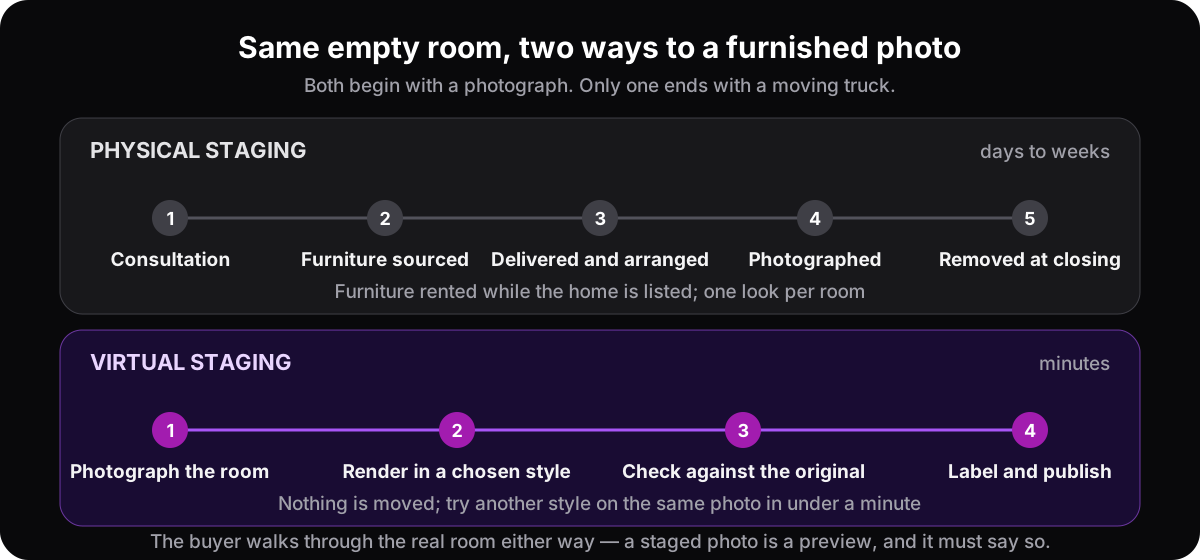
Traditional staging brings real furniture into the property for the length of the listing. Virtual staging edits a photograph and leaves the room empty. Physical staging gives buyers something to walk through at the showing; virtual staging gives them a picture — cheaper by an order of magnitude, ready in minutes, and repeatable in any style you like.
| Physical staging | Virtual staging | |
|---|---|---|
| Cost | Median $1,500 for a staging service, $500 when the agent stages it themselves (NAR, 2025); furniture often rented monthly while listed | Free to a few dollars per image with AI; hand-done editing commonly $10–75+ per photo |
| Turnaround | Days to weeks | 15–60 seconds per AI render; hours to a couple of days when done by hand |
| Variations | One look per room; a restyle means starting over | As many styles as you want on the same photo |
| Works for an occupied home | Hard — the owner's furniture is in the way | Yes — the photo is restyled around what is there; disclose it like any staged image |
| What the buyer receives | A furnished room at the showing | A photo that shows scale and potential; the showing is of the real, unfurnished room, which is why the label matters |
Physical staging genuinely works, and the survey numbers further down say so. Its friction is cost, time, and the fact that it only works once. Virtual staging removes that friction and adds one obligation: the buyer will walk into a room that does not look like the photo, so the photo has to say it was staged.
AI virtual staging vs hand-edited virtual staging
Hand-edited virtual staging means a digital artist places 3D furniture into your photo, one image at a time, usually within a day or two. AI virtual staging does the same job with a model that redraws the room in seconds. The hand-made version gives you more control over individual pieces; the AI version gives you speed, low cost and the freedom to try several styles before choosing one.
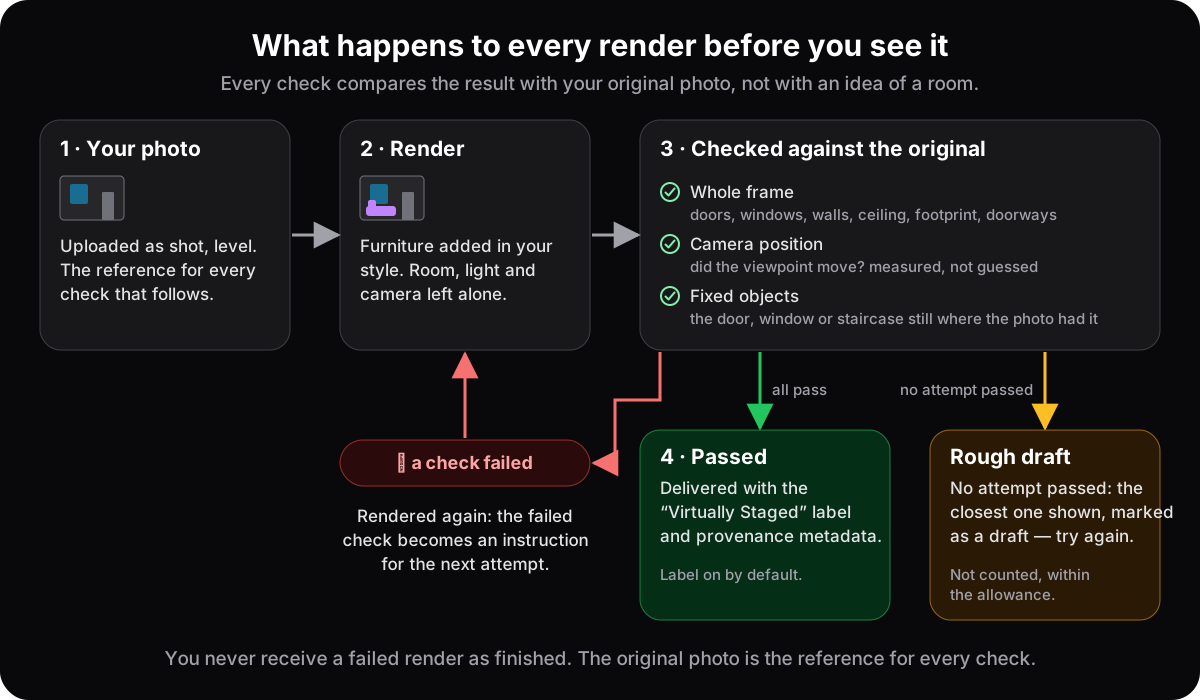
The risk is different too. A person rarely moves a window by accident. A model can: it may widen a doorway, invent a light fixture or turn a closet door into wall. That is why the check against the original matters more with AI than it ever did with hand editing — and why a good AI tool runs that check itself, before the image reaches you.
How does AI virtual staging work?
AI virtual staging does in seconds what a digital artist used to do by hand in hours. You upload a photo, choose a style, and a model redraws the furnishings while holding the architecture — walls, windows, proportions, camera angle — in place. A good tool then checks its own output against your original before showing it to you.
AI virtual staging in five steps
- 1Photograph the room as it isDaylight, lamps off, camera level at chest height, the whole room in frame. Empty, half-renovated or still furnished all work; the render can only be as honest as the photo it starts from — see how to photograph rooms for virtual staging.
- 2Choose a styleJapandi, Scandinavian, traditional, luxury, industrial — or describe the change in your own words. The style library covers interior and outdoor directions from calm to dramatic.
- 3The AI restages the roomIt keeps the architecture — walls, windows, doorways, ceiling height, camera angle — and replaces or adds the furnishings in the style you picked. One render takes 15–60 seconds, depending on how much detail the room has.
- 4Download the resultYou get a finished, photorealistic image of your actual room. Because a second render costs a minute, most people run the same photo in two or three directions before choosing.
- 5Check it against the original before you publishCount the windows. Find the fixtures. Compare the floor, the ceiling and the doorways. If anything but the furnishings moved, reject the render. At AI Flip Room this check runs automatically on every render before it reaches you — how that works — but the habit is worth keeping whatever tool you use. Then label the image and keep the original alongside it.
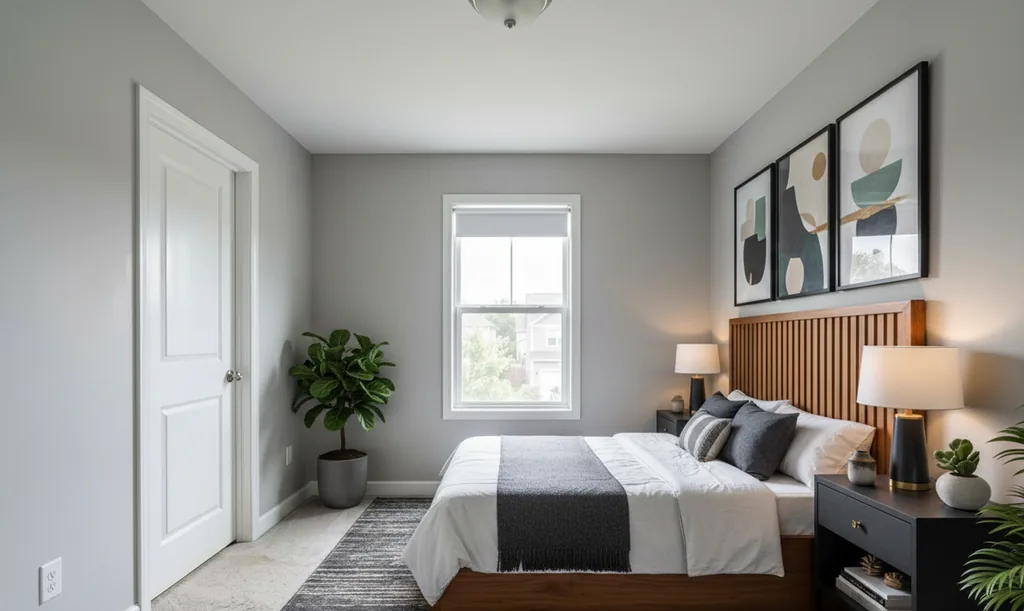
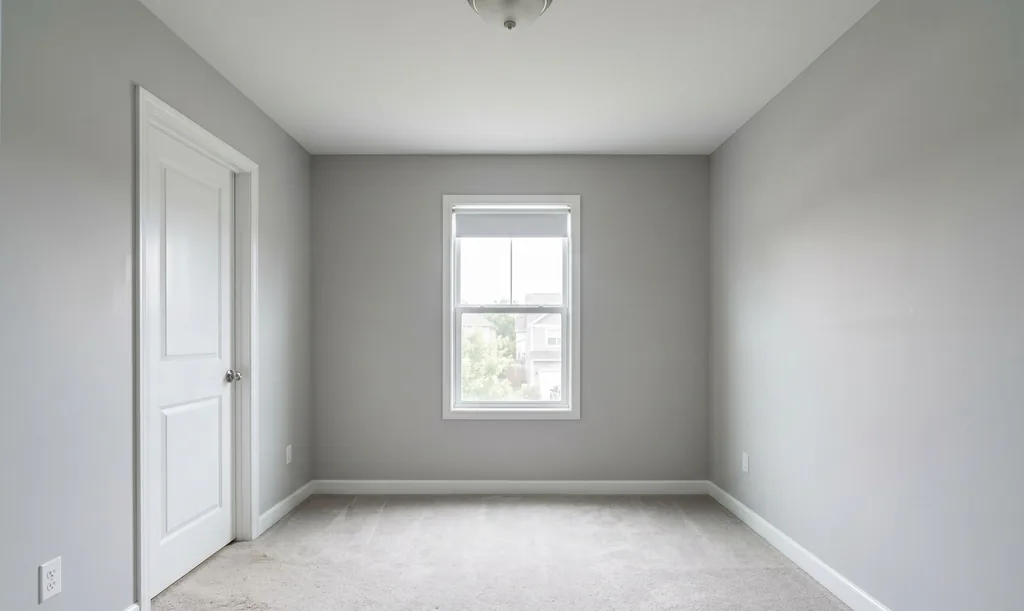
Because the render is built from your actual photo, it stays anchored to the real space. And because a render costs seconds rather than hours, you can try the same room several ways and pick the one that suits the property and its likely buyer. Here is one empty bedroom taken in three directions. The door, the window and its roller shade, the ceiling light and the carpet are the same in every frame — look for them.
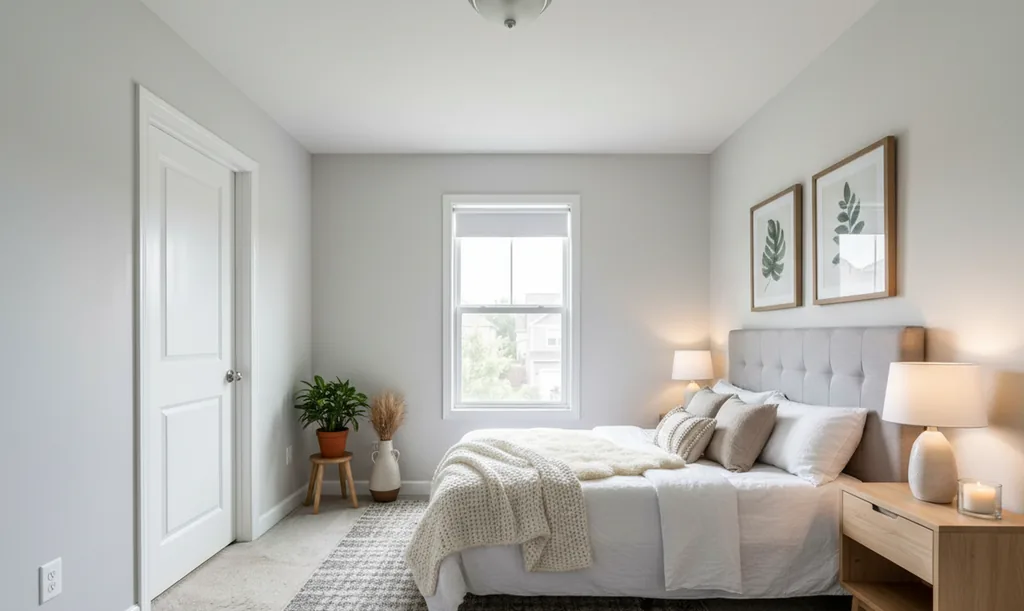
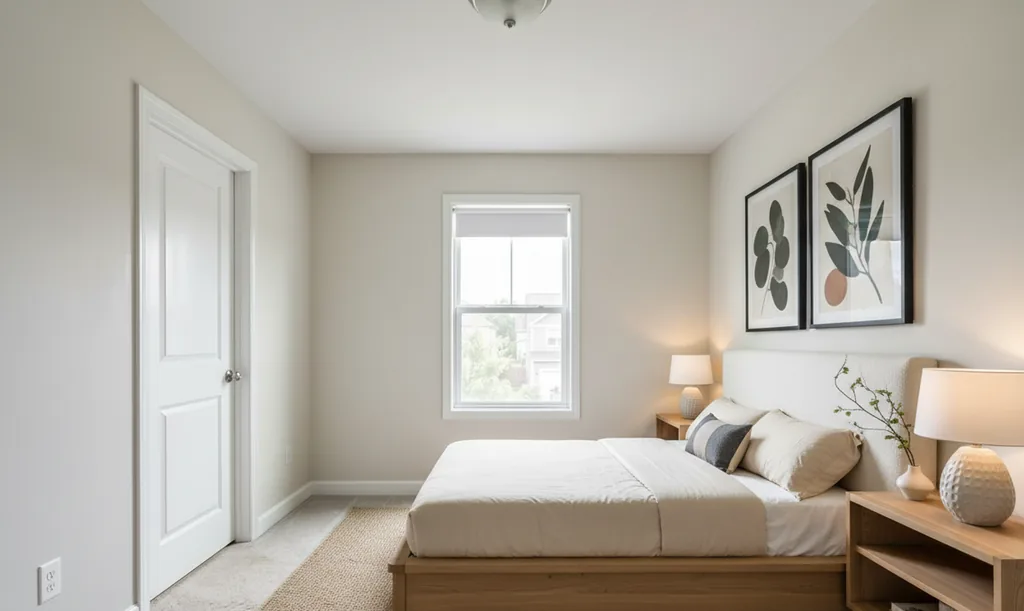
The full style library shows the whole range, and the listing agent's workflow covers which rooms to stage, how many, and what to write in the remarks. If one style is doing most of the work for you, the long-form guides go deeper: modern farmhouse, Scandinavian and Japandi. Outside the walls, the same idea applies to a bare deck or patio — outdoor virtual staging ideas.
How much does virtual staging cost?
Physical staging has a median cost of $1,500 when a professional staging service does it, according to the National Association of Realtors' 2025 member survey. Hand-done virtual staging is commonly quoted at $10 to $75 or more per photo. AI virtual staging runs from free to a few dollars per image, because there is no per-image labour behind it.
The physical figure is from NAR's 2025 Profile of Home Staging, a February 2025 survey of 1,266 Realtors: a median of $1,500 for a staging service, $500 when the seller's agent staged the home themselves. Those are medians, not ceilings. A whole vacant house in an expensive market costs more, and rental fees often continue for as long as the listing sits.
Our own prices, for the record. Every account starts with 3 free renders, for life, no credit card. Pro is 250 renders a month at $46, or $39 a month billed annually ($468 a year); Agency is 1,000 renders a month at $99, or $89 a month billed annually ($1,068 a year). If you run out mid-month, top-up packs add 50 renders for $15 on Pro and 250 for $39 on Agency; without a subscription, a one-time Room Pack adds 20 renders for $9. Purchased renders never expire. A ten-photo gallery, in other words, costs a fraction of one physically staged room. The full comparison, including what drives the price in each model, is in what virtual staging really costs; current plans are on the pricing page.
Is virtual staging legal?
Yes. Virtual staging is legal in every market we have read the rules for, with the same two conditions everywhere: the image may add movable furnishings but may not change the property itself, and most of them also require the buyer to be told it was staged. The tool used is irrelevant; the test is whether the photo still tells the truth about the room.
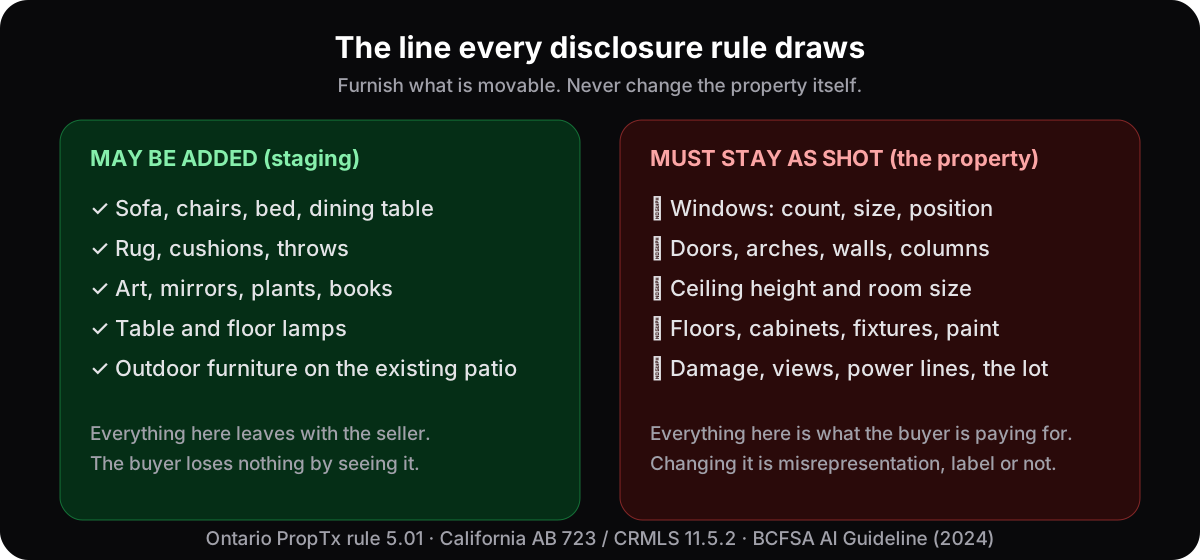
Beyond that principle, the details differ. We read the primary sources for sixteen jurisdictions:
| Jurisdiction | Who sets the rule | What it requires | Full read |
|---|---|---|---|
| Ontario | PropTx MLS Rules, rule 5.01; ITSO MLS Rules, rule 2.15(d) | PropTx bans altered images "that do not accurately depict the listed real estate" and has no label or pairing rule; ITSO, used by the Cornerstone and Brantford boards, requires disclosure in the public remarks or a label; section 37 of TRESA bans false, misleading or deceptive advertising everywhere | Ontario rules |
| California | AB 723 (statute, from 1 January 2026) plus CRMLS rule 11.5.2 | A conspicuous statement that the image was altered and a link to the original; on CRMLS, a label in the photo description, the original immediately before or after, no changes to the property itself; a warning, then a $250 fine. In Los Angeles, The MLS™/CLAW asks for a label and a link instead of the pair | California rules · Los Angeles |
| British Columbia | BCFSA Artificial Intelligence Guideline (2024) | Virtual staging "may be okay" if altered photos are labelled; false or misleading advertising is prohibited under the Rules | BC rules |
| Quebec | OACIQ advertising guideline, section 6.3.1 (2026) | A clear and visible statement that an AI image was used; never hide defects or alter the structure; keep the originals and provide them on request | Quebec rules |
| Alberta | Provincial MLS® System Listing Rules, rule 2.04 (January 2024) | Virtually staged images must be disclosed in the public remarks; "Virtually Enhanced" images and photos that may misrepresent the property are not permitted | Alberta rules |
| New York | Upstate, the New York State Alliance MLS rules (1 September 2026); statewide, 19 NYCRR 175.25(c)(9) | Upstate, a "Virtually Staged" text overlay on the photo and the original directly before it; staging limited to furnishings and wall décor. Statewide, an "honest and accurate description" in every advertisement. No staging rule found in REBNY's RLS or OneKey's public pages | New York rules |
| Florida | The MLSs: Stellar MLS Article 04.04 and the rulebooks of SEFMLS, BeachesMLS and realMLS; statewide, section 475.25(1)(c) of the Florida Statutes | On Stellar, "Virtually staged" in the photo description, a checkbox and a fixed opening line in the public remarks; no words on the photo; outdoors, only unattached furniture or décor. realMLS also asks for a non-enhanced photo. Statewide, no fraudulent, false, deceptive or misleading advertising | Florida rules |
| Texas | The MLSs: HAR Rule 1.25.1, NTREIS rule 7.30, Unlock MLS rule 2.15 and SABOR section 1.2(b); statewide, section 1101.652(b)(23) of the Occupations Code and TREC rule 535.155 | On HAR, staging limited to furnishings and wall décor, disclosed in the Photo Description; a watermark and the unaltered view only for images that alter the property. NTREIS: a true current photograph without modifications that misrepresent. Unlock: a non-virtually staged image of the same view. SABOR: the virtually staged option on the photo-description pick list. Statewide, no advertisement that misleads or is likely to deceive | Texas rules |
| Washington | The state: RCW 18.85.361(2) and the Department of Licensing's advertising guideline; NWMLS's rulebook is members-only and not quoted here | No false descriptions the licensee knew or with reasonable care could have known to be false; advertising must not be capable of misleading a reasonable consumer. No label or pairing rule in any published Washington text; a secondary source says NWMLS asks for a "virtually staged" label on the image or in the photo description | Washington rules |
| Arizona | The MLSs: ARMLS rule 8.23 (since 28 May 2026) and MLSSAZ section 1.19(I) in Tucson; statewide, rule R4-28-502 of the Arizona Administrative Code | On ARMLS, every digitally altered photo, staging included, carries the MLS's own "Digitally Altered" watermark and sits directly before or after its original; no other text on the image; $200 fines from December 2026. On MLSSAZ, a "virtual staged" disclosure along the top of the image and the unmodified photo adjacent. Statewide, no "misleading or ambiguous impressions" | Arizona rules |
| Illinois | The MLSs: MRED section 6.2 (unchanged in substance since 2014) and, in the Metro East, MARIS; statewide, section 10-30 of the Real Estate License Act | On MRED, furniture and other personal property may be added and nothing outside the owner's control added or removed; the disclosure is a Yes/No field, "Are Any Property Photos Virtually Staged?"; no watermark, no pair, and no text, logos or branding on the photo. MARIS exempts staging from its altered-photo rule. Statewide, no advertising that is "fraudulent, deceptive, inherently misleading, or proven to be misleading in practice" | Illinois rules |
| Bright MLS (MD, PA, VA, DC) | The MLS: the Bright MLS rules, Appendices C and D (since 22 July 2026), for Maryland, Delaware, DC and parts of Pennsylvania, New Jersey, Virginia and West Virginia; statewide, the advertising rules of Maryland, Pennsylvania and Virginia | Furniture and other personal property may be added and nothing outside the owner's control added or removed; the Private and Public Remarks must say the image is "virtually staged or digitally modified"; no watermark, no pair, and no added text, graphics or logos on the photo. Under state law, no misleading advertising | Bright MLS rules |
| Georgia | The MLSs: FMLS rule 20.1(e) (effective 14 January 2026), Georgia MLS's photo policy (9 September 2020) and the Hive MLS rules (May 2026) for Savannah, Augusta and Athens; statewide, Georgia Real Estate Commission rule 520-1-.09 | Furniture and other personal property may be added; buildings next door, power lines and other elements outside the owner's control may not be removed; the disclosure goes in the public remarks on all three. FMLS bans text on the photo and Georgia MLS bans watermarks, while Hive MLS also wants the label on the photo or in its description. Only Georgia MLS wants the current-state image immediately before or immediately after the staged one. Statewide, no misleading advertising | Georgia rules |
| Colorado | The MLSs: REcolorado's MLS Policy, section 1.20 (revised November 2025), the IRES rules (revised August 2026) and the elevateMLS rules (effective 19 August 2026) for El Paso and Teller counties; statewide, Colorado Real Estate Commission rule 6.10.C and section 12-10-217 | Virtual staging is allowed on all three; REcolorado and elevateMLS ban any photo where the true appearance of the property has been manipulated, the landscape included. REcolorado and IRES ask for no label; elevateMLS wants the "Virtually Staged" field set to Y, the exact phrase "Virtually Staged" in the Property Description and the Photo Remarks, its own watermark on the photo and the unaltered original uploaded. Statewide, no false or misleading advertising | Colorado rules |
| Australia | The Consumer Law and the portals: Australian Consumer Law section 18 and section 30; realestate.com.au's Acceptable Use Policy, clause 4.1.40 (amended September 2026); Domain's image rules; in each state, the agent law and the regulator, NSW Fair Trading's advertising guidelines above all | No staging rule; a misleading photo is banned everywhere. realestate.com.au publishes AI-edited photos only with the AI use "clearly disclosed in a prominent location on or adjacent to the relevant content"; NSW Fair Trading bans "digitally removing or adding features" | Australia rules |
| United Kingdom | The law, the codes and the portals: the Digital Markets, Competition and Consumers Act 2024, sections 226 and 227; The Property Ombudsman's codes; Rightmove's help page and Zoopla's member terms; in Scotland and Wales, the letting codes | No staging rule; the law and the codes ban a misleading picture. Rightmove wants AI images "displayed alongside genuine photographs of the property"; Zoopla says a member using AI-made photos "will make this clear" | UK rules |
For the general principles and three ways to word a label, see the disclosure guide. If you are on the other side of the transaction, what a buyer can demand from a virtually staged listing covers the same rules from the buyer's chair. None of this is legal advice; each of those articles quotes its sources and says what we did and did not verify.
What do agents and buyers actually think of virtual staging?
The most useful numbers come from the National Association of Realtors 2025 Profile of Home Staging, a survey of 1,266 members. Staging in general scores well: 83% of buyers’ agents said it made it easier for a buyer to picture the property as their future home, 49% of sellers’ agents said it cut time on market, and 29% reported offers 1–10% higher. Virtual staging on its own scores lower — and it is worth saying so plainly.
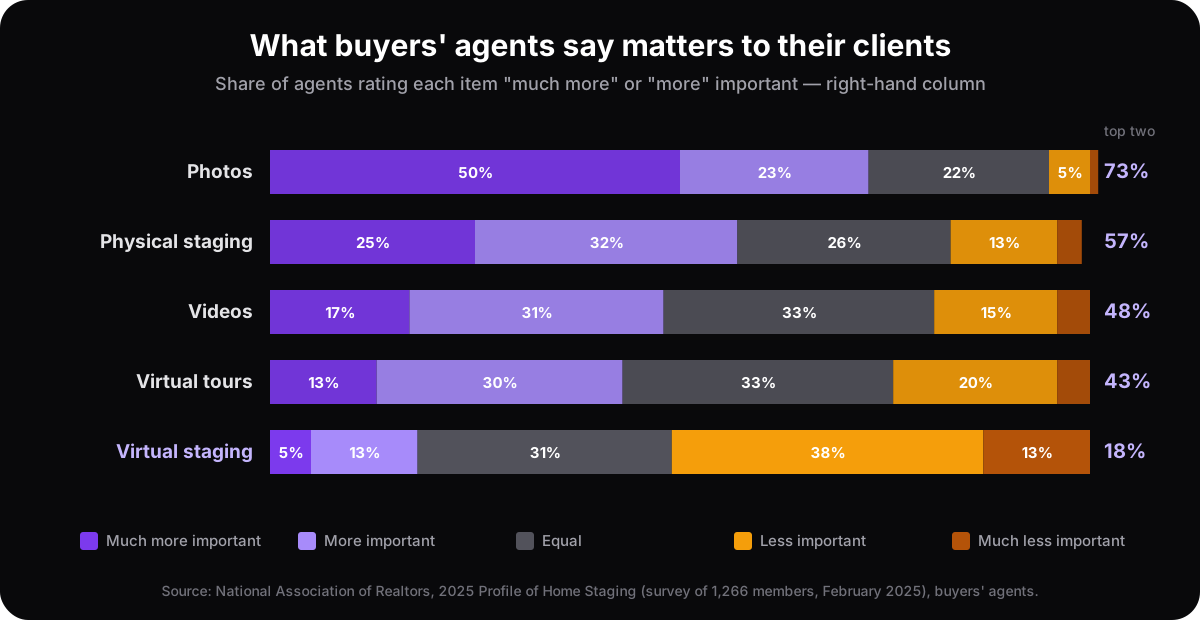
Only 18% of buyers’ agents called virtual staging more important to their clients, against 73% for photos and 57% for physical staging. The reason is not mysterious: buyers value what is real. A staged photo that sets up a disappointment at the showing costs more than it earns, and agents have seen plenty of those. The lesson is not to skip virtual staging but to do it the honest way — real room, real light, only movable things added, clearly labelled, original kept.
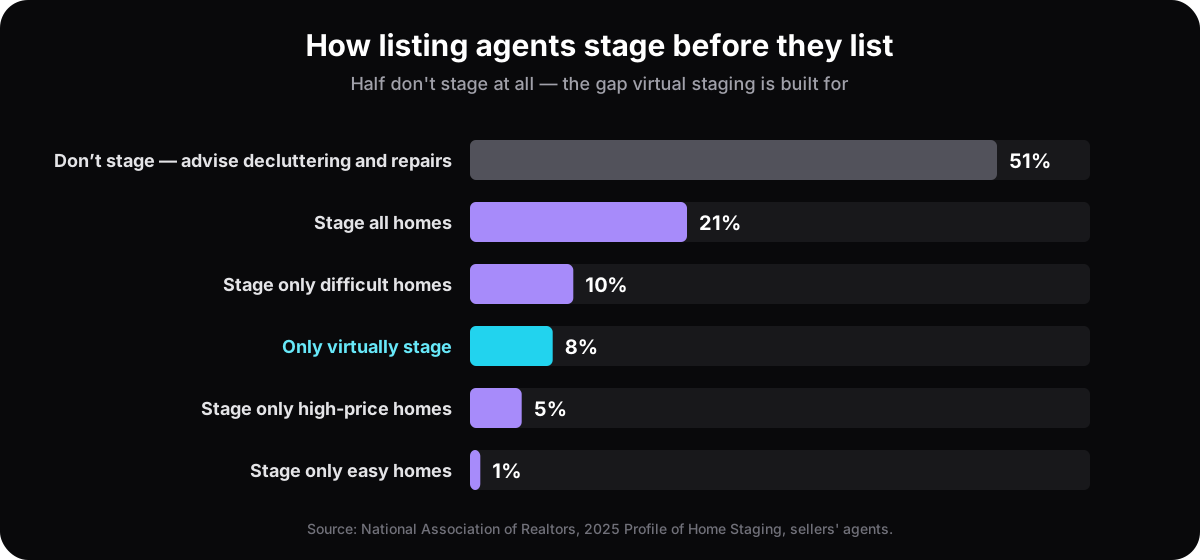
The second chart is the other half of the story. Half of listing agents don’t stage at all; they advise the seller to declutter and fix faults. For an empty or dated home, that means the listing goes online with bare, echoing rooms. That is the gap virtual staging fills: the real choice is usually between a staged photo and no staging, not between a staged photo and a professionally furnished house. And 31% of buyers’ agents said staging made buyers more willing to walk through a home they saw online — which is the whole job of a listing photo.
When does virtual staging help most?
Virtual staging earns its keep where a buyer's imagination fails: empty rooms, rooms full of someone else's belongings, and any space where the photo has to do the selling before a showing is booked. It also works as a planning tool for renovations, where the point is your own decision rather than a buyer's.
- Empty rooms. A vacant room is the hardest thing to sell — buyers struggle to judge scale, and an empty photo gives them nothing to hold on to. Furnishing it digitally gives them a reference point. The vacant-property playbook is in how to sell an empty house faster.
- Dated or cluttered rooms. When a space is full of someone else's belongings, restyling the photo lets a buyer see past them.
- Outdoor spaces. Patios, decks and yards shape first impressions as much as interiors, and outdoor furniture on an existing patio stages as well as a sofa in a living room. Leave the lawn, the planting and the structures as they are; that is the property. What belongs out there, and what must stay untouched, is in outdoor virtual staging ideas.
- Planning a renovation. Homeowners and flippers can preview a finished look on their real room before spending on furniture or contractors — the homeowner side is on AI room design for homeowners, and the most expensive room of all has its own page, AI kitchen design from a photo.
NAR's 2025 survey shows where agents concentrate physical staging, and the same priorities apply to virtual: the living room (91%), the primary bedroom (83%) and the dining room (69%) were the most commonly staged rooms, and 83% of buyers' agents said staging made it easier for a buyer to picture the property as their future home. For an honest look at what staging can and cannot do for a sale, read does virtual staging help sell homes.
What does good virtual staging look like — and bad?
Good virtual staging is boring in the best way: you look at it and see a nicely furnished version of the same room, and nothing makes you look twice. The furniture is the right size for the space, the light on it comes from the real windows, the shadows fall where they should, and every door, window, outlet and ceiling line is exactly where it is in the original.
Bad virtual staging announces itself. A sofa blocks the only doorway. A window over the sink appears where the original had a blank wall. A closet door quietly turns into plaster behind the headboard. The room feels a metre wider than it is, the view out of the window is a different view, the floor changed from carpet to oak. Some of these are style mistakes; most are the one mistake the rules care about — the photo stopped telling the truth about the room.
The fastest test is the one in the steps above: put the staged image next to the original and check the things that cannot move. If you would be embarrassed to show a buyer both images side by side, the staged one is not ready.
How do you get the best results?
Four habits do most of the work: a good source photo, a style matched to the likely buyer, more than one attempt, and restraint. The most effective staged photo looks like a real, well-kept room rather than a magazine set, because the showing has to live up to it and the buyer will remember which it was.
- Start with a good photo. Daylight with the lamps off, the camera level at chest height, the whole room in frame. The AI can only work with what you give it — the seven habits are in how to photograph rooms for virtual staging.
- Match the style to the buyer. A family home and a downtown condo call for different looks. Browse the style library and pick what fits the property and the person likely to buy it. To see what the choice does to a single room, here is one empty living room in ten styles.
- Try more than one. The strength of virtual staging is that re-running the same photo in another style costs you nothing but a minute.
- Keep it believable. Furniture that would actually fit, light that matches the windows, nothing that sets up disappointment at the showing.
- Keep the original and label the render. Save the untouched photo, put "Virtually staged" on the image or in its caption, and you have satisfied the rule wherever you are.
Try it on your own room
Virtual staging is one of the highest-leverage things you can do for a listing or a renovation plan: it is fast, it is inexpensive, and it changes how people feel about a space the moment they see it.
The quickest way to understand it is to try it. Upload a room photo, pick a style, and see your own space restaged in 15–60 seconds, depending on how much detail it has — start for free, no credit card required.
Questions people ask about virtual staging
What does "virtually staged" mean on a listing?+
It means the furniture, rugs, art and decor in that photo were added digitally and are not in the home. The room itself — walls, windows, floors, fixtures — should be exactly as photographed. An honest listing labels every staged image and can show you the untouched original of the same shot; in a CRMLS listing in California the original must sit right next to the staged photo.
Is virtual staging the same as photo editing?+
No. Ordinary editing — exposure, white balance, cropping, straightening — adjusts how a true photograph looks. Virtual staging adds things that are not there. Disclosure rules treat the two differently for that reason: California's AB 723 excludes routine corrections from its definition of an altered image but covers anything that adds, removes or changes elements, furniture included.
Can you virtually stage a room that already has furniture?+
Yes. AI tools restyle a furnished or half-renovated room as readily as an empty one. Two cautions. The render must keep the architecture intact whatever is in the room, and digitally removing furniture that will not stay with the house counts as an alteration under CRMLS — so disclose a restyled furnished room the same way you would a staged empty one.
How long does AI virtual staging take?+
One render takes 15–60 seconds, depending on how much detail the room has, compared with hours for a hand-edited image and days to weeks for physical staging. A second or third style on the same photo takes another minute. That is the practical difference between the methods: you can compare directions instead of committing to one.
Is virtual staging worth it?+
For a vacant listing, almost always: the alternative is an empty photo or a physical staging bill with a median of $1,500 for a staging service in NAR's 2025 survey. For a furnished, well-kept home the gain is smaller. Either way it is a preview, not a transformation — it helps buyers see scale and potential, and the showing still has to deliver the real room. The verdict by situation, with a break-even test: is virtual staging worth it.
Is there free virtual staging?+
Some tools, ours included, let you try a few renders without paying. At AI Flip Room every account gets three free renders for life with no credit card; after that a one-time Room Pack is 20 renders for $9, and the Pro and Agency plans are for people staging every week. Free renders carry a small watermark, which is fine for deciding but not for a listing.
Can you virtually stage a kitchen, a bathroom or a backyard?+
Yes, with care. Kitchens and bathrooms are mostly fixtures — cabinets, counters, tile, sinks — which a listing photo must not change, so staging there means stools, a bowl of lemons, towels and plants rather than a new kitchen. A renovation preview can change finishes as long as nobody presents it as the property. Backyards stage well with outdoor furniture on paving that already exists; the lawn and planting are part of the property. See outdoor virtual staging ideas.
How can you tell if a listing photo is virtually staged?+
Look for the label first — virtually staged, on the image or in the caption; what “virtually staged” means explains it and the labels that look similar — and ask for the unedited original, which a serious agent has in a minute. Then compare what should never change: count the windows, find the doors and outlets, check the floor and ceiling line. Furniture that seems to float, shadows that don't match the windows and impossibly perfect rugs are the usual tells. Buyers' rights are covered in what a buyer can demand.
See it on your own room
Upload a photo and watch AI restage your space in 15–60 seconds, depending on how much detail it has — free to try, no credit card.
Try AI Flip Room freeGot a question about this?
Something unclear or not covered? Ask here. We read every question and answer the useful ones right in the article. Nothing you write is published.
Related reading
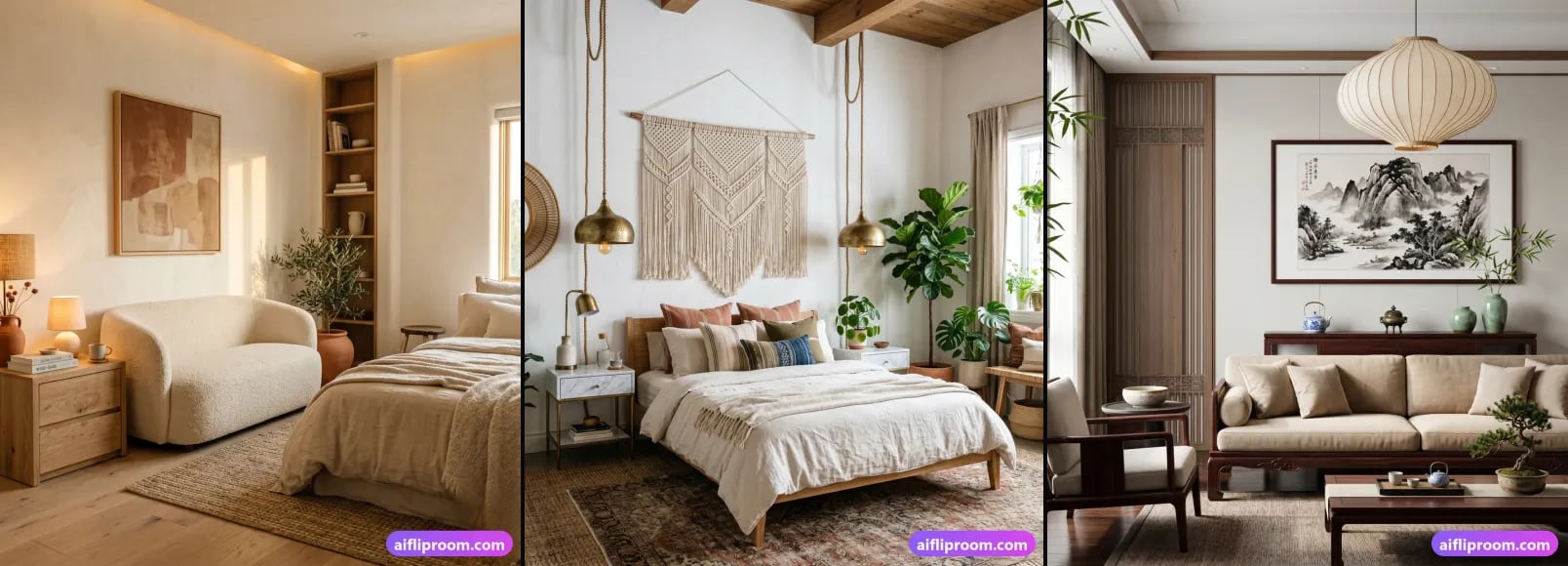
Virtual Staging Cost in 2026: Free to $75+ per Photo
Physical vs hand-done virtual staging ($10–75 per photo) vs AI (free to a few dollars). Real 2026 ranges, what drives price, and which fits your listing.
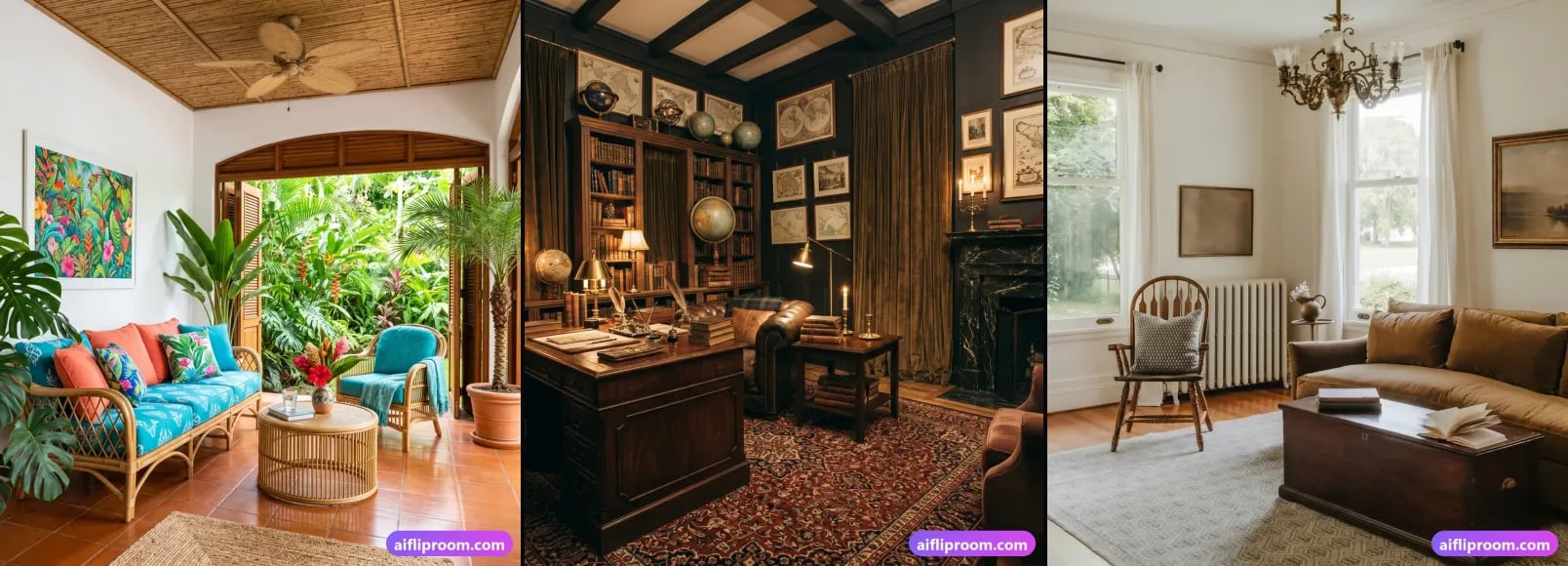
Does Virtual Staging Help Sell Homes? An Honest Answer
Virtual staging changes the photo, not the price. Where it helps, where it is wasted, what NAR's 2025 survey actually measured, and what can go wrong.
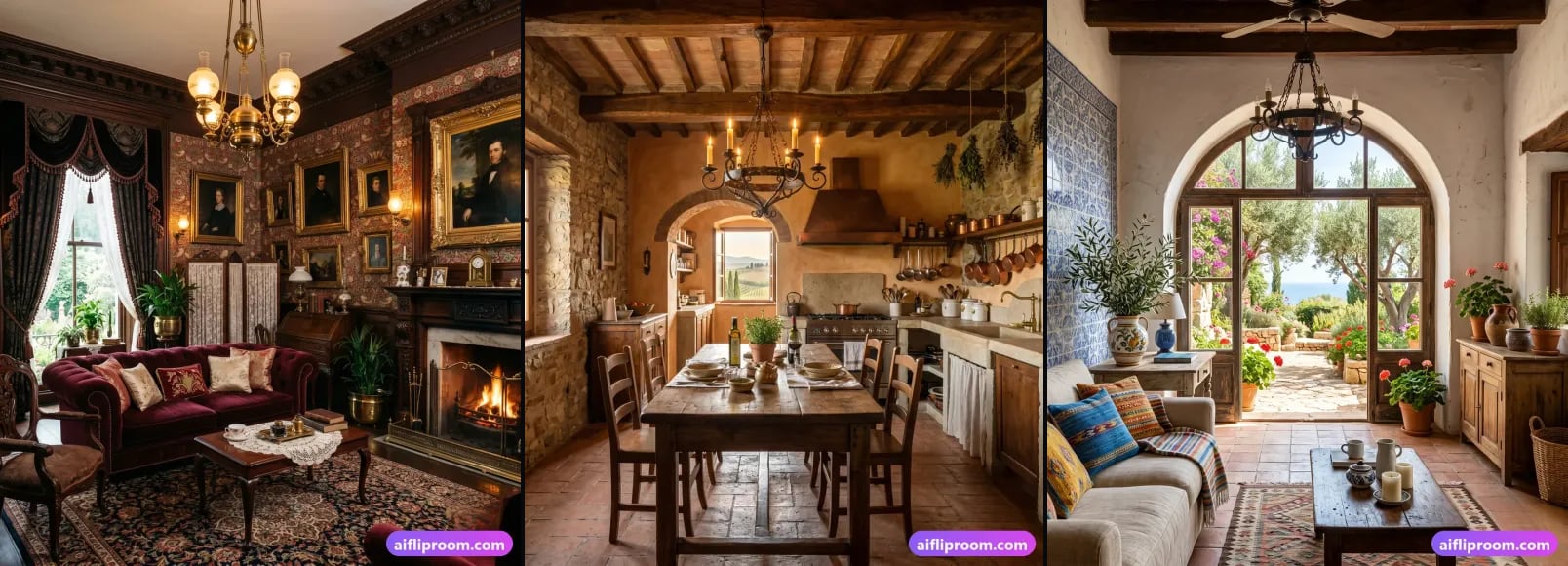
Virtual Staging Disclosure Rules: How to Label Staged Photos
Why disclosure is required, three ways to label a virtually staged photo, what you may change vs never touch, and the rules of sixteen jurisdictions compared.