Virtual Staging Questions We Get From Agents and Homeowners
AI Flip Room · 1 min read
These are the virtual staging questions listing agents and homeowners ask most often in the places we read and answer every week: comments under real estate posts, forum threads and question-and-answer sites. We rewrote each question in our own words rather than the asker's, and kept every answer short.
Each answer links to the page on this site that backs it, and its numbers come from that page; prices come from the pricing page. We make an AI staging tool, so we have an interest here, and where an answer is about our own plans it says so. Nothing here is legal advice: for a listing, your MLS rulebook and your regulator have the last word.
Rules, labels and buyers
Is virtual staging allowed on the MLS?+
In every rulebook we have read, yes, on two conditions: the photo may add movable furnishings but may not change the property itself, and the buyer should be told it was staged. That holds in all sixteen jurisdictions of our rules series. What differs is the detail: whether the label goes on the photo, in the photo description or in the remarks, and whether the untouched original has to sit beside the staged photo. Upstate New York's Alliance MLSs want "Virtually Staged" on the photo; on Stellar MLS in Florida, words on the photo are prohibited. Check your own board, then see MLS virtual staging rules by state and province.
Do I have to label virtually staged photos, and what should the label say?+
In most places, yes. In California it is the law: AB 723 asks for a conspicuous statement that the image was altered plus a link to the original. Elsewhere it comes from the MLS rulebook or the general ban on misleading advertising. "Virtually staged" is enough for a badge or a caption, and CRMLS rule 11.5.2 also lists "Photo Modified", "Digitally Altered" and "AI Altered" for the photo description. Use the same words on every staged frame, and check where your MLS wants them: some ban text on the photo. The disclosure wording tool gives the words and the place for your MLS; the background is in how to label staged photos.
Will buyers feel misled when they see the empty room at the showing?+
They can, in two ways: a render that changed the house, such as a window moved, a doorway narrowed or a crack painted over, and a missing label. Staging may add movable things like furniture, rugs and art; it may not change the property. Keep the empty original in the listing next to the staged photo, so the showing confirms what the buyer already saw instead of surprising them. And a label says that a photo was edited, not what was edited, so it does not cover a changed room. More in the house didn't look like the photos and is virtual staging worth it.
Should I virtually stage a rental listing?+
Usually, when the unit is empty between tenants: renters scroll photos the way buyers do, and every vacant week costs rent you are not collecting. If the unit is let furnished, the photos must show the furniture the tenant will get; virtual staging is for empty units. A rental photo is still advertising, so label it as virtually staged and keep the original. In California this becomes law for rentals on 1 January 2027: an ad with an altered photo must disclose it on or next to the image. More in is virtual staging worth it and which style for which listing.
Does it work?
Is virtual staging worth it for a vacant listing?+
Usually yes when the photo is the problem: a vacant home, a room nobody can read, a bare patio. Usually no when the home already photographs well, because a render then adds a label and a disclosure duty without adding a buyer. And never as a fix for price, condition or a defect. The money is rarely the question: a staging service had a median cost of $1,500 in NAR's 2025 survey, while AI renders cost nothing to try and cents to a few dollars each. For most homes, three to five renders cover the rooms that matter. The math is in is virtual staging worth it.
Do buyers prefer staged rooms or empty ones?+
For the photos, staged usually wins: an empty room gives a buyer no sense of scale. But most of the evidence is agents' opinions, not sale results. In NAR's 2025 staging survey, 83% of buyers' agents said staging made it easier for a buyer to picture the home as their future home, and 49% of listing agents said it cut the time on the market. Virtual staging has very little data of its own: we found no independent study of whether virtually staged listings sell faster. Every number, with its source, is in home staging statistics; when it pays off is in is virtual staging worth it.
Will virtual staging replace physical staging?+
For the listing photos, sometimes; for the showing, no. The buyer still walks through the real, empty room, and a render furnishes a photo, not the house. In NAR's 2025 survey a staging service had a median cost of $1,500, 8% of listing agents only staged virtually, and 51% of listing agents didn't stage before listing at all. A render takes 15–60 seconds, which makes virtual staging the cheap way to fix the photos of a vacant home; physical staging is the one a buyer sees in person. Keep the empty original beside the staged photo either way. The numbers are in home staging statistics, the trade-off in is virtual staging worth it.
Photos, tools and cost
What kind of photo works best for virtual staging?+
A level daylight photo taken with the phone's normal 1x lens. Open the blinds and switch the lamps off, hold the phone level at chest height, about 1.2–1.5 m (4–5 ft) off the floor, and back into a corner or a doorway for width instead of switching to the ultra-wide. Keep one room per frame and clear the loose stuff, but leave built-ins, radiators and the fireplace. Upload a JPG, PNG or WEBP straight from the camera, up to 15 MB; the render works from about 1024 px, so any phone photo has pixels to spare. All seven rules are in how to photograph rooms for virtual staging.
Can't I just stage a photo with ChatGPT or another general AI tool?+
For ideas, yes: a mood board, a style for a seller to react to, a picture of what an empty room could be. For a listing photo, the risk is the room, not the furniture. A tool that redraws your photo can move a window, change the floor, close an archway or shift the camera, and a label doesn't fix a different house. If you use one, start every attempt from the original photo, name what must stay, compare the result with the original feature by feature, and add the label your MLS asks for yourself. The two-minute check is in virtual staging with ChatGPT, Gemini or Canva.
Why did the AI change a window or a door, and how do I catch it?+
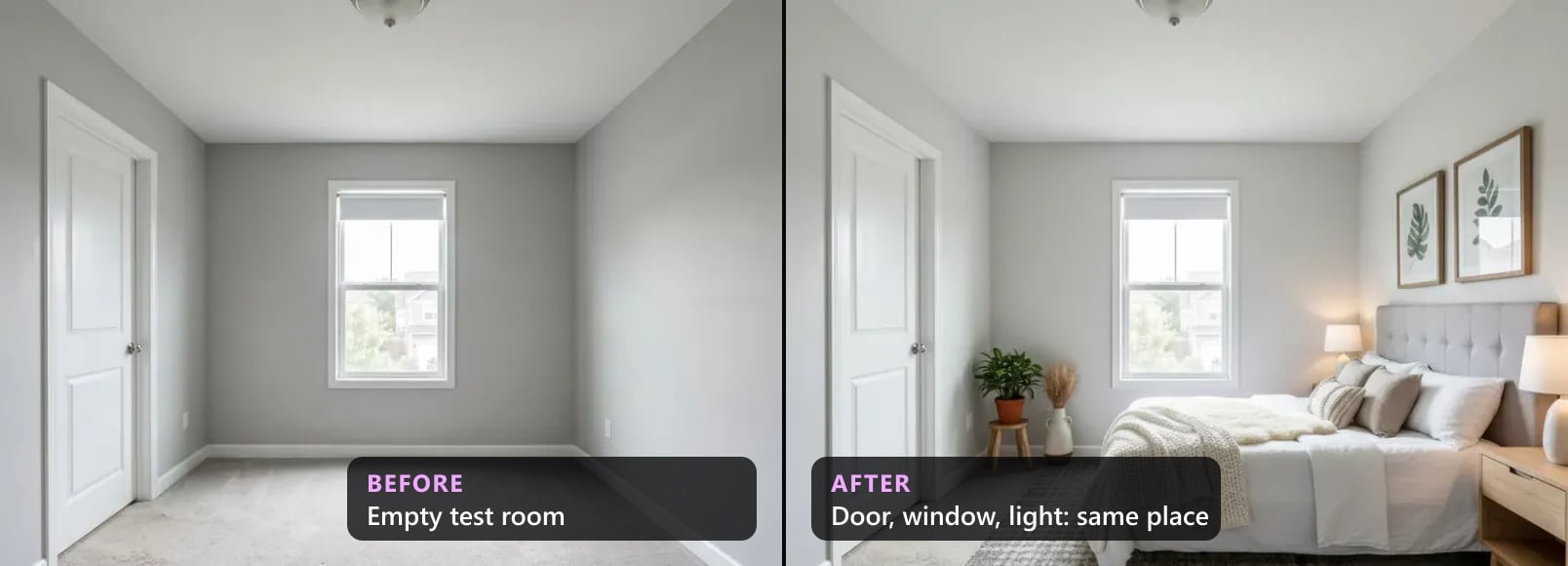
Because the model redraws the whole picture, not just the furniture, and what breaks is the house. In our own count of 300 AI-staged renders, the drafts with notes most often had a window problem, then a lost or changed archway or opening, a moved camera and a changed door. Living rooms broke most: more windows and openings in one frame means more to lose. To catch it, put the render next to the original and check the windows, doors, openings, ceiling, floor and camera. Our checker does this automatically, but it misses some camera moves, so look anyway. The details are in what breaks in AI virtual staging.
How much does virtual staging cost per photo?+
On AI Flip Room, one render is one of your photos restaged in one style, and the first 3 renders are free. After that a render costs $0.45 with the one-time Room Pack (20 renders for $9), about $0.18 on Pro and about $0.10 on Agency, if you use the whole monthly allowance. For comparison, hand-done virtual staging is commonly quoted at $10 to $75 or more per photo. Getting the look right often takes more than one attempt, and with AI a second attempt is one more render, so count the re-runs, not only the price of one. The plans are on the pricing page; what virtual staging costs compares the options.
Is there a free virtual staging app?+
Free to try, yes. Every new AI Flip Room account gets 3 free renders for life, with no card. Free renders carry a watermark, so they are for judging the realism on your own room rather than for a listing. To stage a whole listing without a watermark, the cheapest paid way in is the one-time Room Pack: 20 renders for $9, with no subscription and no expiry date. The free renders never reset, and there is no trial countdown. Start on the free virtual staging page; the plans are on the pricing page.
For homeowners
Can it change the wall colour or show a renovation?+
For your own planning, yes. In the ordinary styles our AI can repaint the walls and swap light fixtures, because colour and light are part of a style, so you can test a palette on a picture of your own wall before you buy paint. What a preview cannot do is price the work, tell you what is behind a wall or replace a measured drawing. For a listing photo it is different: some rulebooks count a new wall colour as changing the property, so switch on MLS mode, which is built to change furniture and decor only. More in see your room before you renovate and which style for which listing.
Can you virtually stage a backyard or a patio?+
Yes, on the same line as indoors: furnish, do not alter. Add a dining set, loungers, a rug, an umbrella, potted plants or a fire bowl to the patio or deck that is already there. The lawn, beds, paving, pool, fence, house and view stay exactly as photographed; CRMLS in California states that AI-generated landscaping images are not permitted. A landscaping preview is fine for your own planning, labelled as a concept. AI Flip Room has ten outdoor styles on the Pro and Agency plans, and a render takes 15–60 seconds. Ideas, and the full list of what to leave alone, are in outdoor virtual staging ideas.
Have a question we haven't answered? Ask it in the form below. We read every one, and the useful ones get an answer on this page, in the same plain words.
Written by the AI Flip Room team. How we write and check our guides.
See it on your own room
Upload a photo and watch AI restage your space in 15–60 seconds, depending on how much detail it has — free to try, no credit card.
Try AI Flip Room freeGot a question about this?
Something unclear or not covered? Ask here. We read every question and answer the useful ones right in the article. Nothing you write is published.
Related reading

MLS Virtual Staging Rules by State and Province (2026)
MLS virtual staging rules for sixteen jurisdictions in one 2026 table: who sets the rule, whether a label is required, and whether the original goes beside it.

Is Virtual Staging Worth It? When Yes, When No, and the Math
Is virtual staging worth it? Verdicts by listing type, a break-even test with your own numbers, the costs nobody mentions, and when to skip it.
We Checked 300 AI-Staged Renders: What Breaks (2026)
Our quality checker's data on 300 AI-staged renders, Aug–Oct 2026: how many failed, what broke most (windows, archways, doors), what to check by eye.